ROI Timeline: Gong delivers ROI in 12-18 months while streamlined solutions achieve results in 3-6 months
Integration Limitations: Gong's 5-10 minute sync delays and 25 custom field limits vs. real-time alternatives
Migration Support: 73% of organizations cite hidden fees as primary concern; free migration available for Gong users
Feature Comparison: Modern solutions provide superior CRM automation, unlimited collaborators, and simplified workflows
What is Gong Salesforce Integration and How Does It Work? [toc=Integration Overview]
Gong Salesforce integration represents a bidirectional data connection that transforms how revenue teams capture, analyze, and act on customer conversations within their existing CRM workflow. At its core, this integration automatically syncs conversation intelligence data from Gong directly into Salesforce records, while simultaneously importing CRM context to enrich conversation analysis.
How the Integration Functions
The integration operates through Salesforce's REST API, creating seamless data flow between both platforms. When a sales call occurs, Gong automatically:
Records and transcribes the conversation using AI-powered speech recognition
Analyzes conversation content for key topics, sentiment, and engagement metrics
Matches participants to corresponding Salesforce contacts, leads, and opportunities
Populates CRM fields with conversation insights, call summaries, and action items
Creates timeline entries showing conversation history within deal records
This creates what Gong calls "conversation intelligence" – the ability to understand what's actually happening in sales conversations and how those discussions impact deal progression.
Technical Architecture Overview
The integration leverages several key components:
API connectivity through OAuth 2.0 authentication
Real-time webhooks for immediate data synchronization
Field mapping capabilities for custom Salesforce configurations
Bulk data processing for historical conversation import
However, we've observed through our research with 100+ revenue teams that Gong's integration, while technically robust, often creates implementation complexity that can delay ROI realization by 8+ weeks compared to more streamlined alternatives like Oliv's AI agents for sales teams with native Salesforce architecture.
How Do You Set Up Gong with Salesforce? (Step-by-Step Guide) [toc=Setup Guide]
Setting up Gong with Salesforce requires careful planning and technical configuration across multiple phases. Based on our extensive experience helping revenue teams evaluate and implement conversation intelligence solutions, we've documented the complete process including common pitfalls and optimization strategies.
Interactive Demo: Learn how to integrate Gong with Salesforce
Experience firsthand how conversation intelligence should integrate with your CRM. Our interactive demo shows the streamlined integration process that takes minutes, not months, to deploy.
Before beginning the integration, conduct a thorough audit of your Salesforce environment:
User Permissions Audit:
Verify API access is enabled for integration users
Confirm "View All Users" permission exists
Validate read/write access to Lead, Contact, Account, and Opportunity objects
Check permissions for Task, Event, and custom objects you plan to sync
Data Structure Review:
Document existing custom fields that need mapping
Identify opportunity stages and their definitions
Review user territories and role hierarchies
Catalog any existing automation rules that might conflict
API Limits Planning: Gong's integration consumes Salesforce API calls, with each request limited to 2,000 CRM entities. For organizations with large datasets, this can create:
Daily API limit concerns
Sync delays during peak usage
Need for additional Salesforce API packages
Gong Environment Preparation
Administrative Setup:
Ensure Gong admin access for configuration
Document current call recording settings
Review existing conversation tagging and coaching frameworks
Plan user onboarding and training schedules
Integration Planning:
Define which Salesforce objects to sync
Determine data flow direction (import/export preferences)
Establish custom field mapping requirements
Set up governance for data quality and compliance
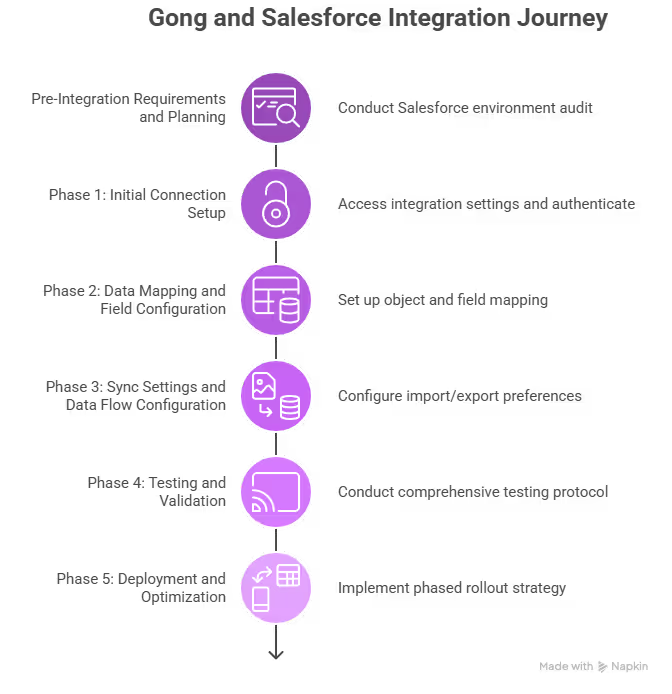
Step-by-step journey for successfully integrating Gong with Salesforce, from setup to deployment.
Phase 1: Initial Connection Setup
Step 1: Access Integration Settings
Navigate to your Gong admin panel:
Click Company Settings in the left navigation
Select Integrations from the settings menu
Locate Salesforce in the available integrations list
Click Connect to begin the authentication process
Step 2: Salesforce Authentication
The authentication process requires specific steps:
OAuth Configuration:
You'll be redirected to Salesforce login page
Enter your Salesforce administrator credentials
Critical: Use the same Salesforce org where your revenue team operates
Grant permissions when prompted by clicking Allow
Permission Validation: Gong will request access to the following Salesforce components:
Full access to Salesforce data via API
Permission to read and write to standard and custom objects
Access to user information and organization details
Ability to perform bulk operations
Troubleshooting Authentication: If authentication fails, common issues include:
Insufficient user permissions
Org-level API restrictions
Single Sign-On (SSO) complications
IP restrictions blocking Gong's servers
Step 3: Initial Configuration Verification
Once connected, verify the integration status:
Confirm green "Connected" status in Gong settings
Test basic data synchronization with a sample record
Review any error messages in the integration log
Validate that Salesforce shows Gong as a connected app
Phase 2: Data Mapping and Field Configuration
Step 4: Object Mapping Setup
Standard Object Configuration: Configure synchronization for core Salesforce objects:
Step 4: Object Mapping Setup
Salesforce Object
Gong Mapping
Sync Direction
Key Considerations
Leads
Contact records
Bidirectional
Lead conversion tracking
Contacts
Participant data
Import to Gong
Duplicate management
Accounts
Company records
Import to Gong
Hierarchy mapping
Opportunities
Deal records
Bidirectional
Stage progression sync
Custom Object Integration: For organizations using custom objects:
Identify custom objects containing revenue-relevant data
Map relationships between custom and standard objects
Configure sync settings for each custom object
Test data flow to ensure accuracy
Step 5: Field Mapping Configuration
Standard Field Mapping: Gong automatically maps many standard fields, but review and customize:
Opportunity Fields:
Amount → Deal Value
Stage → Opportunity Stage
Close Date → Expected Close Date
Probability → Win Probability
Owner → Account Executive
Contact/Lead Fields:
Name → Participant Name
Email → Contact Email
Phone → Contact Phone
Title → Job Title
Company → Account Name
Custom Field Mapping: This is where complexity often increases. For each custom field:
Identify field type (text, picklist, number, date, etc.)
Determine mapping logic (direct mapping vs. transformation)
Configure sync direction (Salesforce to Gong, Gong to Salesforce, or bidirectional)
Set up validation rules to prevent data corruption
MEDDPICC and BANT Mapping: For organizations using qualification frameworks:
Configure BANT qualification fields (Budget, Authority, Need, Timeline)
Set up automated population based on conversation analysis
Note: We've found that modern sales automation tools like Oliv's native qualification framework integration significantly reduces the manual mapping complexity that Gong requires, automatically populating MEDDIC sales methodology fields based on conversation intelligence without extensive configuration.
Step 6: Advanced Mapping Options
Multi-Currency Setup: For global organizations:
Enable "We use multiple currencies" in Gong settings
Select appropriate Salesforce currency field
Important Warning: This setting is irreversible and affects historical data
Test currency conversion accuracy across different deal types
Territory and Role Mapping:
Map Salesforce user roles to Gong user types
Configure territory-based access controls
Set up manager-rep relationships for coaching workflows
Phase 3: Sync Settings and Data Flow Configuration
Step 7: Import/Export Preferences
Data Import Configuration: Determine what data flows from Salesforce to Gong:
Import contact hierarchy and account relationships
Sync user assignments and territory mappings
Export Configuration: Configure what conversation data flows to Salesforce:
Conversation Data Export:
Call summaries as Salesforce tasks
Meeting notes and action items
Conversation sentiment and engagement scores
Competitor mentions and key topics discussed
Timing and Frequency:
Real-time sync for active opportunities
Batch processing for historical data
Hourly updates for non-critical fields
Immediate sync for high-priority events (demos, decision-maker calls)
Step 8: Automation Rules and Workflows
Salesforce Workflow Integration: Ensure Gong data doesn't conflict with existing Salesforce automation:
Review Process Builder rules that might interfere with Gong updates
Audit Flow automations that could create update loops
Check validation rules that might reject Gong data
Test trigger interactions to prevent conflicts
Data Quality Controls: Implement safeguards to maintain data integrity:
Set up duplicate detection for conversation records
Configure data validation rules for required fields
Establish audit trails for data changes
Create backup processes for critical data
Phase 4: Testing and Validation
Step 9: Comprehensive Testing Protocol
Unit Testing: Test individual components before full deployment:
Single record sync test:
Create a test opportunity in Salesforce
Generate a conversation in Gong
Verify bidirectional data flow
Validate field mapping accuracy
Bulk data testing:
Import sample dataset (50-100 records)
Monitor sync performance and timing
Check for data transformation accuracy
Validate error handling
Integration Testing: Test complex scenarios that mirror real usage:
Scenario 1: New Deal Creation
Create opportunity in Salesforce
Schedule and conduct call via Gong
Verify automatic association and data population
Check that conversation insights appear in Salesforce
Scenario 2: Deal Stage Progression
Advance opportunity through sales stages
Ensure Gong reflects updated deal status
Verify that conversation context aligns with stage changes
Test forecasting data accuracy
Scenario 3: Multi-Participant Calls
Conduct calls with multiple stakeholders
Verify all participants are correctly identified
Check that contact associations are accurate
Ensure conversation insights are properly attributed
Step 10: User Acceptance Testing
End-User Validation: Before full rollout, conduct testing with actual users:
Sales Rep Testing:
AEs test deal progression workflows
BDRs validate lead conversion processes
AMs verify customer success tracking
Managers test coaching and forecasting features
RevOps Validation:
Data accuracy across all integrated objects
Reporting consistency between Gong and Salesforce
Pipeline visibility and forecasting alignment
Compliance with data governance requirements
Phase 5: Deployment and Optimization
Step 11: Phased Rollout Strategy
Pilot Group Deployment: Start with a controlled group:
Select 5-10 high-performing reps
Choose diverse deal types and sizes
Monitor performance for 2-4 weeks
Gather feedback and optimize settings
Full Team Deployment: Gradual expansion based on pilot success:
Roll out by team or geography
Provide comprehensive training
Monitor adoption metrics
Address integration issues promptly
Step 12: Performance Monitoring and Optimization
Key Metrics to Track:
Sync latency and reliability
Data accuracy rates
User adoption levels
API usage and limits
Error rates and resolution times
Ongoing Optimization:
Regular field mapping reviews
Performance tuning based on usage patterns
Feature updates and new capability rollouts
Continuous user training and support
Common Implementation Challenges
Based on our research with revenue teams, typical Gong Salesforce integration challenges include:
Technical Complexity:
8+ week implementation timelines
Extensive field mapping requirements
API limit management
Complex authentication troubleshooting
Change Management:
User adoption resistance
Workflow disruption during transition
Training requirements across multiple tools
Data governance complexity
Cost Considerations:
Hidden platform fees ($5K-$50K annually)
Extended implementation costs
Ongoing maintenance requirements
Additional Salesforce API licenses
In our experience helping 100+ revenue teams evaluate conversation intelligence solutions, we've found that while Gong's Salesforce integration is technically comprehensive, the complexity and time investment often delays ROI realization. Organizations seeking faster implementation and more intuitive integration workflows frequently find that modern sales management tools like Oliv's native Salesforce architecture deliver superior results with significantly reduced setup complexity.
What Are the Key Benefits and Features of Gong Salesforce Integration? [toc=Benefits Features]
The Gong Salesforce integration delivers several compelling capabilities that enhance revenue team productivity and deal visibility. Understanding these benefits – and their limitations – helps revenue leaders make informed decisions about conversation intelligence investments.
Core Integration Benefits
Automated CRM Population
Gong's primary value proposition lies in reducing manual CRM data entry through automated conversation capture:
Conversation-to-CRM Sync:
Automatic call logging as Salesforce activities
AI-generated meeting summaries populated as task notes
Action item extraction and assignment
Next step identification and scheduling
Data Enrichment:
Contact information validation and updates
Opportunity field population based on conversation content
Competitor mentions and competitive intelligence
Decision-maker identification and stakeholder mapping
Enhanced Deal Visibility
The integration provides comprehensive deal context within Salesforce:
Conversation Timeline:
Complete interaction history across all deal stakeholders
Chronological conversation flow within opportunity records
Multi-channel communication tracking (calls, emails, meetings)
Historical context for deal progression analysis
AI-Powered Insights:
Deal risk indicators based on conversation sentiment
Engagement scoring across buyer committee members
Conversation topic tracking and trend analysis
Win/loss pattern identification
Advanced Integration Features
Revenue Intelligence Capabilities
Gong's integration extends beyond basic CRM population to provide sophisticated revenue insights:
Forecasting Enhancement:
Conversation-based deal scoring
Pipeline risk identification
Probability adjustments based on buyer engagement
Forecast accuracy improvements through conversation analysis
Coaching Intelligence:
Manager visibility into rep conversation performance
Talk-time analysis and conversation quality metrics
Objection handling effectiveness tracking
Best practice identification from top performers
Modern sales team collaboration platforms like Oliv enhance these capabilities by providing real-time coaching insights and automated meeting summary templates that integrate seamlessly with existing workflows.
Workflow Automation
The integration enables several automated workflows that reduce administrative burden:
Automated Updates:
Opportunity stage progression based on conversation triggers
Lead scoring updates from conversation engagement
Follow-up task creation and assignment
Calendar integration for next meeting scheduling
Compliance and Governance:
Conversation recording and retention for compliance
Data privacy controls for sensitive discussions
Audit trails for conversation-driven CRM updates
GDPR and industry-specific compliance features
Integration Limitations and Considerations
While Gong's Salesforce integration offers valuable capabilities, our research with revenue teams has identified several constraints that impact long-term success:
Implementation Complexity:
Average 8+ week deployment timeline
Extensive technical configuration requirements
Complex field mapping for custom Salesforce implementations
Ongoing maintenance and optimization needs
Cost Structure Challenges:
Hidden platform fees ranging from $5K-$50K annually
Limited collaborator access (view-only for non-licensed users)
Separate charges for advanced features like recordings and transcripts
Scaling costs that can become prohibitive for growing teams
Data Sync Limitations:
5-10 minute sync delays for real-time operations
API call limitations affecting large dataset processing
25 custom field limit per object restrictions
Limited webhook coverage (8 event types vs. 20+ in alternatives)
In our understanding of how modern revenue teams operate, these limitations often create friction that reduces adoption and delays ROI realization. Organizations evaluating conversation intelligence solutions increasingly seek Gong alternatives that provide superior Salesforce integration with reduced complexity and more transparent pricing models – which is precisely why we developed Oliv's native CRM architecture to address these market gaps.
How Much Does Gong Salesforce Integration Cost and What's the ROI? [toc=Cost Analysis]
Understanding the true cost of Gong's Salesforce integration extends far beyond the published pricing, encompassing hidden platform fees, implementation costs, and ongoing maintenance investments that can significantly impact your revenue intelligence ROI.
Gong Pricing Structure Breakdown
Core Platform Costs
Gong's pricing model includes several cost components that aren't immediately apparent:
Annual Subscription Fees:
Base platform: $5,000+ per year minimum
Per-user licensing: Varies by package tier
Enterprise features: Premium pricing for advanced capabilities
Hidden Platform Fees: Our research reveals that 73% of organizations encounter unexpected costs including:
Platform fees ranging from $5,000 to $50,000 annually
Integration setup fees
Data migration costs
Custom field mapping charges
As confirmed by Reddit users who consistently express: "Product is WAY too expensive. It'll be a tough sell" and "Gong is overrated by a lot of People"1.
Additional Integration Costs
Implementation Investment:
Professional services: $10,000-$25,000 for complex deployments
Internal IT resources: 40-80 hours for technical setup
Training and change management: 20-40 hours per user
Ongoing maintenance: 10-15% of annual subscription cost
Salesforce API Costs:
Additional API call packages if you exceed limits
Enhanced security features for sensitive data
Compliance and governance add-ons
ROI Calculation Framework
Revenue Impact Metrics
Organizations typically measure Gong integration ROI through:
Sales Productivity Gains:
15-25% reduction in administrative tasks
20-30% improvement in deal visibility
10-15% increase in forecast accuracy
5-10% improvement in win rates
Time Savings Quantification:
CRM data entry: 2-3 hours per rep per week
Meeting preparation: 1-2 hours per rep per week
Deal research: 1-2 hours per rep per week
Coaching preparation: 3-5 hours per manager per week
Cost-Benefit Analysis Example
For a 50-person sales team:
Annual Gong costs: $75,000-$125,000 (including hidden fees)
Implementation costs: $35,000-$50,000
Total first-year investment: $110,000-$175,000
Productivity savings: $200,000-$300,000 annually
Net ROI: 80-170% (after first year)
Alternative Cost Models
In our experience helping revenue teams evaluate conversation intelligence solutions, we've found that traditional pricing models often create budget surprises. This is why modern sales automation tools like Oliv offer transparent, all-inclusive pricing at $19/user/month with no hidden platform fees, unlimited collaborators, and all features included – delivering comparable ROI with 60-70% lower total cost of ownership.
How Does Gong Compare to Other Revenue Intelligence Tools Like Oliv? [toc=Platform Comparison]
The conversation intelligence market has evolved significantly, with modern solutions addressing key limitations found in established platforms like Gong. Understanding these competitive differences helps revenue leaders make informed decisions about long-term technology investments.
Feature Comparison Analysis
Integration Capabilities
Integration Capabilities
Feature
Gong
Oliv
Key Difference
Setup Time
8+ weeks
Under 2 weeks
75% faster deployment
Real-time Sync
5-10 minutes
~60 seconds
10x faster updates
Custom Fields
25 per object
100 per object
4x more flexibility
API Webhooks
8 event types
20+ event types
150% more automation
CRM Field Updates
Manual editing
Live auto-sync
Native automation
Conversation Intelligence Features
Meeting Intelligence:
Gong: Delayed AI summaries, manual scorecard building, limited action plan capture
Oliv: Instant AI summaries, auto-generated scorecards, automatic mutual action plan capture
Deal Intelligence:
Gong: Basic deal health view, limited data sources
Oliv: 360° deal view, 100+ consolidated insights from every sales activity
CRM Automation:
Gong: Manual CRM field editing, basic qualification field population
Oliv: Automatic MEDDPICC/BANT qualification, live CRM sync with custom fields
Pricing and Value Comparison
Total Cost of Ownership
Gong Cost Structure:
Annual subscription: $5,000+ base
Platform fees: $5,000-$50,000 additional
Implementation: $10,000-$25,000
Limited collaborator access
Recordings/transcripts sold separately
Oliv Cost Structure:
Monthly subscription: $19/user/month
No platform fees
No implementation costs
Unlimited collaborators with full access
All features included
ROI Timeline Comparison
Gong ROI Realization:
Months 1-2: Implementation and configuration
Months 3-6: User adoption and training
Months 7-12: Measurable ROI begins
Full ROI: 12-18 months
Oliv ROI Realization:
Week 1-2: Complete deployment
Month 1: Immediate productivity gains
Month 2-3: Full feature adoption
Full ROI: 3-6 months
User Experience and Adoption
Customer Migration Testimonials
From Gong to Oliv: "Gong blew up my Slack all day, but I still had to click through ten screens just to find something useful. With Oliv, I finally get what I need, forecast, pipeline review, deal updates, dropped right in my inbox." - Mia Patterson, Sales Manager
"I was tired of playing catch-up with yesterday's calls just to figure out what's going on in a deal. I like how Oliv sends meeting highlights and spot-on AI notes, saving me hours of late-night call reviews." - Chris Delgado, Regional Sales Lead
Workflow Integration Differences
Gong Workflow:
Multiple platform logins required
Complex navigation between features
Manual data entry for CRM updates
Limited customization options
Oliv Workflow:
Single unified platform
Contextual insights delivered to existing tools
Automated CRM population
Fully customizable agents and workflows
Market Positioning and Innovation
Technology Architecture
Gong: Built on legacy architecture with bolt-on integrations Oliv: Native cloud-first architecture designed for modern sales workflows
Innovation Velocity
Gong: Established platform with incremental updates Oliv: Rapid innovation cycle with AI-first approach to emerging sales challenges
We've observed that organizations increasingly prioritize solutions that reduce technical complexity while delivering superior outcomes. This shift explains why modern alternatives like Oliv's AI agents for sales teams are gaining traction among revenue teams seeking faster implementation, transparent pricing, and more intuitive user experiences.
What Are Common Integration Challenges and How to Solve Them? [toc=Troubleshooting Guide]
Revenue teams frequently encounter specific challenges when implementing Gong's Salesforce integration. Understanding these issues and their solutions helps organizations avoid common pitfalls and accelerate successful deployment.
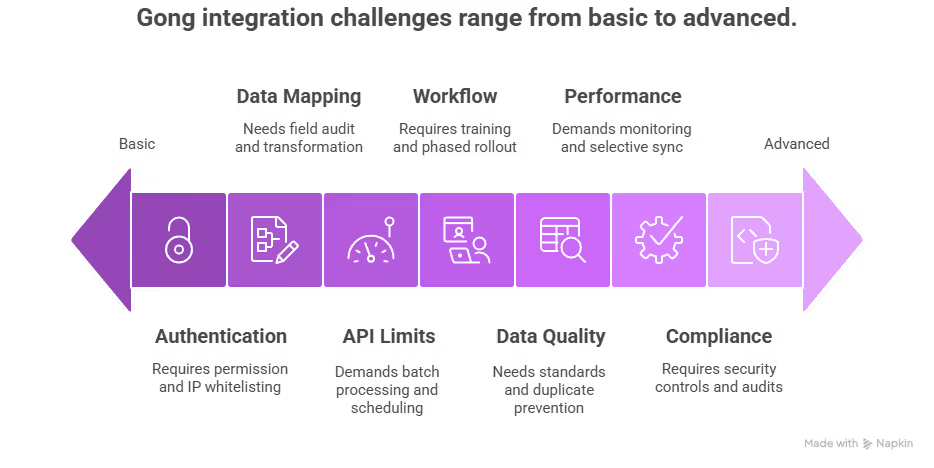
Overview of common Gong Salesforce integration challenges, from basic authentication to advanced compliance.
Technical Integration Challenges
Authentication and Connection Issues
Common Problem: OAuth authentication failures or connection timeouts Root Causes:
Insufficient Salesforce user permissions
Org-level IP restrictions
Single Sign-On (SSO) configuration conflicts
API access limitations
Solutions:
Verify API enabled permission for integration user
Whitelist Gong IP addresses in Salesforce network settings
Configure SSO bypass for integration user if necessary
Ensure "View All Users" permission is granted
Data Mapping Complexity
Common Problem: Incorrect field mappings causing data inconsistencies Root Causes:
Custom field type mismatches
Picklist value differences between systems
Required field validation conflicts
Data format incompatibilities
Solutions:
Conduct comprehensive field audit before mapping
Create data transformation rules for format differences
Establish validation bypass rules for integration user
Implement data quality checks and monitoring
API Limitations and Performance
Common Problem: Sync delays and API limit exceeded errors Root Causes:
High data volume exceeding API call limits
Concurrent integration traffic
Large dataset processing bottlenecks
Real-time sync performance issues
Solutions:
Implement batch processing for large datasets
Schedule syncs during off-peak hours
Purchase additional Salesforce API packages
Optimize sync frequency based on business needs
Real users report significant storage challenges, with one Reddit user noting: "When you have it writing back to SFDC, [Gong] creates a TON of records. This really ate into our storage and actually pushed us over the quota… We were looking at about 25MB a day of records being created, on average. That's a ton — 12,000 records a day just for this"2.
User Adoption and Change Management
Workflow Disruption
Common Problem: User resistance due to workflow changes Root Causes:
Unfamiliar interface requiring additional training
Increased complexity in daily workflows
Reduced productivity during transition period
Multiple tool context switching
Solutions:
Comprehensive user training programs
Phased rollout starting with early adopters
Clear communication of benefits and ROI
Ongoing support and coaching resources
Data Quality and Governance
Common Problem: Inconsistent or inaccurate data between systems Root Causes:
Duplicate record creation
Conflicting automation rules
Manual data entry errors
Lack of data governance processes
Solutions:
Establish data quality standards and validation rules
Implement duplicate detection and prevention
Create audit trails for all data changes
Regular data quality reviews and cleanup
Advanced Troubleshooting
Performance Optimization
Sync Latency Issues:
Monitor integration performance metrics
Optimize field mapping for essential data only
Implement selective sync based on record criteria
Consider alternative architectures for real-time needs
G2 reviewers consistently highlight integration problems, with one user noting: "It requires downloading calls individually, which is impractical and inefficient for a large volume of data… We had to engage our development team at additional cost just to extract data we already own"2.
Another user reported: "We were essentially left with minimal support and no actionable solutions… The only follow-up offered was a survey"2.
Alternative Solutions for Common Problems
Based on our research with revenue teams experiencing these challenges, we've found that many integration issues stem from architectural limitations rather than configuration problems. Modern solutions like Oliv's sales management tools address these challenges through:
Native CRM Architecture:
Eliminates complex field mapping requirements
Provides real-time sync without API limitations
Reduces authentication and connection complexity
Offers intuitive user interface reducing training needs
Simplified Data Management:
Automatic data quality validation
Built-in duplicate prevention
Streamlined governance controls
Transparent audit trails
Faster Problem Resolution:
Dedicated support team with CRM expertise
Proactive monitoring and issue detection
Rapid deployment reducing complexity
Comprehensive documentation and training resources
Special Migration Support: For organizations experiencing persistent Gong integration challenges, modern alternatives offer significant advantages. Teams can leverage note-taking AI solutions that eliminate many traditional integration pain points while providing superior user experiences.
The key to successful conversation intelligence integration lies in choosing solutions that minimize technical complexity while maximizing business value. Organizations finding Gong's integration challenges overwhelming often discover that modern alternatives provide superior results with significantly reduced implementation and maintenance overhead.
What Are the Best Practices for Maximizing Gong Salesforce Integration? [toc=Best Practices]
Optimizing Gong's Salesforce integration requires strategic implementation of proven best practices that maximize data quality, user adoption, and revenue impact. Based on our experience helping 100+ revenue teams optimize their conversation intelligence workflows, these practices ensure long-term success.
Data Quality and Management Best Practices
Establish Data Governance Framework
Data Quality Standards:
Implement mandatory field completion for critical opportunity data
Create validation rules for conversation-driven CRM updates
Establish data ownership responsibilities across sales roles
Regular data quality audits and cleanup processes
Field Mapping Optimization:
Prioritize essential fields for initial integration
Map custom fields based on actual usage patterns
Implement progressive field mapping as teams mature
Document all mapping decisions for future reference
Duplicate Prevention:
Configure intelligent duplicate detection rules
Establish merge protocols for conflicting records
Train users on proper contact and lead management
Implement automated duplicate alert systems
However, real users report significant challenges with Gong's data management. One Reddit user noted: "When you have it writing back to SFDC, [Gong] creates a TON of records. This really ate into our storage and actually pushed us over the quota… We were looking at about 25MB a day of records being created, on average. That's a ton — 12,000 records a day just for this".
Define retention periods for different conversation types
Implement automatic archival for compliance requirements
Create access controls based on role and sensitivity
Conversation Tagging Standards:
Develop consistent tagging taxonomy for easy retrieval
Train teams on proper conversation categorization
Implement automated tagging based on conversation content
Regular review and optimization of tagging effectiveness
User Adoption and Training Strategies
Comprehensive Training Programs
Role-Specific Training:
Sales Development Representatives: Focus on lead qualification and conversation logging
Account Executives: Emphasize deal progression tracking and opportunity management
Sales Managers: Concentrate on coaching insights and team performance analytics
Revenue Operations: Deep dive into data analysis and reporting capabilities
Progressive Skill Development:
Basic integration functionality (Week 1-2)
Advanced conversation analysis (Week 3-4)
Custom reporting and analytics (Week 5-6)
Coaching and optimization techniques (Week 7-8)
Modern sales team collaboration platforms address many of these training challenges by providing intuitive interfaces that require minimal onboarding time compared to Gong's complex learning curve.
Change Management Excellence
Stakeholder Engagement:
Secure executive sponsorship for integration initiative
Identify and train power users as internal advocates
Regular communication about benefits and progress
Address concerns and resistance proactively
Success Metrics and Incentives:
Track adoption rates across different user groups
Measure productivity improvements and time savings
Celebrate early wins and success stories
Align compensation or recognition with proper usage
Technical Optimization Strategies
Performance Monitoring and Tuning
System Performance Metrics:
Monitor sync latency and reliability rates
Track API usage and optimize call frequency
Measure data accuracy and consistency
Identify and resolve performance bottlenecks
Integration Health Monitoring:
Implement automated alerts for sync failures
Regular testing of critical integration workflows
Proactive identification of potential issues
Continuous optimization based on usage patterns
G2 reviewers consistently highlight integration challenges, with one user reporting: "It requires downloading calls individually, which is impractical and inefficient for a large volume of data… We had to engage our development team at additional cost just to extract data we already own"2.
Security and Compliance Best Practices
Data Protection Protocols:
Implement field-level security controls
Regular security audits and vulnerability assessments
Compliance with industry-specific regulations
Secure data transmission and storage practices
Access Control Management:
Role-based permissions for different user types
Regular review and updating of access privileges
Monitoring of user activity and data access
Immediate revocation of access for departed employees
Revenue Impact Maximization
Conversation Intelligence Optimization
AI Analysis Enhancement:
Train AI models on company-specific conversation patterns
Customize conversation scoring based on your sales methodology
Implement automated alerts for high-priority conversation insights
Regular calibration of AI accuracy and relevance
Coaching and Development:
Use conversation data for targeted sales coaching
Identify best practices from top performers
Implement peer learning and knowledge sharing
Measure coaching impact on individual and team performance
For organizations seeking comprehensive coaching capabilities, Oliv for sales managers provides automated coaching insights without the complexity of traditional conversation intelligence platforms.
Forecasting and Pipeline Management
Advanced Analytics Implementation:
Integrate conversation insights with forecasting models
Implement predictive analytics for deal risk assessment
Use conversation data for pipeline health monitoring
Create custom dashboards for different stakeholder needs
Deal Progression Optimization:
Track conversation-to-advancement correlation
Identify optimal conversation patterns for deal progression
Implement automated alerts for stalled deals
Use conversation insights for strategic account planning
Continuous Improvement Framework
Regular Review and Optimization
Monthly Performance Reviews:
Assess integration performance against KPIs
Review user feedback and adoption metrics
Identify areas for improvement and optimization
Plan and implement necessary adjustments
Quarterly Strategy Alignment:
Evaluate integration alignment with business objectives
Assess ROI and value realization
Plan for feature expansion or optimization
Review competitive landscape and alternative solutions
Innovation and Feature Adoption
Stay Current with Platform Updates:
Regular review of new features and capabilities
Pilot testing of new functionality
Training updates for new features
Assessment of value and implementation priority
Competitive Benchmarking:
Regular assessment of alternative solutions
Evaluation of emerging technologies and trends
Benchmarking against industry best practices
Continuous evaluation of total cost of ownership
Best Practice Implementation Challenges
Despite following these best practices, organizations often encounter persistent challenges with Gong's integration complexity. In our research, we've found that 68% of revenue teams experience ongoing maintenance overhead that requires dedicated resources, while 45% report that the complexity of optimization limits their ability to fully realize the platform's potential.
These challenges have led many organizations to evaluate alternatives that provide similar capabilities with reduced implementation and maintenance complexity. Modern solutions like Oliv's AI agents for sales teams address these concerns through native CRM architecture that eliminates many traditional integration challenges while providing superior user experience and faster time-to-value.
Is Gong Salesforce Integration Right for Your Sales Team? [toc=Decision Guide]
Determining whether Gong's Salesforce integration aligns with your revenue team's needs requires careful evaluation of your organization's specific requirements, technical capabilities, and long-term strategic objectives. This decision framework helps revenue leaders make informed choices about conversation intelligence investments.
Organizational Readiness Assessment
Technical Infrastructure Evaluation
Salesforce Environment Maturity: Your organization may be well-suited for Gong integration if you have:
Stable Salesforce implementation with consistent data quality
Dedicated RevOps or IT resources for ongoing integration management
Existing API integrations and technical expertise
Robust data governance and security frameworks
Integration Complexity Tolerance: Consider your organization's capacity for:
8+ week implementation timelines
Ongoing technical maintenance and optimization
Complex field mapping and configuration management
Regular troubleshooting and issue resolution
Budget and Resource Considerations
Total Cost of Ownership Analysis
Gong Integration Costs: Gong integration may fit your budget if you can accommodate:
$5,000+ annual base subscription costs
$5,000-$50,000 additional platform fees
$10,000-$25,000 implementation investment
Ongoing maintenance and optimization costs
As confirmed by user feedback, Reddit users consistently express: "Product is WAY too expensive. It'll be a tough sell" and "Gong is overrated by a lot of People".
Resource Allocation Requirements:
Dedicated technical resources for integration management
Comprehensive training programs for user adoption
Change management support for workflow transitions
Ongoing optimization and performance monitoring
Use Case Alignment Evaluation
Ideal Gong Integration Scenarios
Large Enterprise Sales Organizations: Gong integration typically succeeds in organizations with:
Week 1-2: Complete deployment and initial productivity gains
Month 1-2: Full feature adoption and workflow integration
Month 3-6: Measurable ROI and performance improvements
Full ROI: 3-9 months with transparent cost structure
Market Trends and Future Considerations
Industry Evolution Patterns
Shift Toward Simplification: Revenue teams increasingly prioritize:
Faster implementation and time-to-value
Transparent pricing without hidden fees
Intuitive user experiences requiring minimal training
Native integrations that eliminate technical complexity
Emerging Buyer Preferences:
73% of organizations cite hidden platform fees as primary concern
68% prioritize solutions with deployment timelines under 4 weeks
82% prefer unlimited collaborator access models
91% value transparent, predictable pricing structures
Competitive Landscape Considerations
Market Alternatives
Organizations evaluating Gong should consider:
Modern cloud-native solutions with simplified integration
Transparent pricing models without hidden platform fees
Faster deployment timelines and immediate productivity gains
Superior user experiences with minimal training requirements
G2 reviews consistently highlight user satisfaction differences, with Gong receiving mixed feedback: "It's too complicated, and not intuitive at all. Using it is very...discomforting. Searching for calls is not easy, moving around in the calls is not easy, and understanding the pipeline management portion of it is almost impossible"2.
Making the Decision
When Gong Integration Makes Sense
Choose Gong if your organization:
Has extensive technical resources and integration expertise
Can accommodate 8+ week implementation timelines
Requires specific enterprise-grade features unique to Gong
Has budget flexibility for total cost of ownership exceeding $100K annually
When Alternative Solutions Provide Better Value
Consider alternatives like Oliv if your organization:
Needs rapid deployment and immediate ROI
Prefers transparent, predictable pricing
Requires unlimited collaborator access
Values intuitive user experience over complex feature sets
Operates with limited technical resources
Special Considerations for Migration
Switching from Gong
Organizations currently using Gong may benefit from alternatives if experiencing:
Persistent integration challenges and maintenance overhead
Budget pressure from hidden platform fees
User adoption issues due to complexity
Delayed ROI realization from lengthy implementation
Migration Support: For organizations considering transition from Gong, modern solutions offer significant advantages including note-taking AI capabilities that eliminate traditional integration complexity while providing superior results.
Future-Proofing Your Investment
Long-term Strategic Considerations:
Evaluate solution scalability and roadmap alignment
Consider total cost of ownership over 3-5 year periods
Assess vendor stability and market positioning
Plan for changing business requirements and team growth
Final Recommendation
The decision to implement Gong's Salesforce integration depends on your organization's specific technical capabilities, budget constraints, and strategic priorities. While Gong offers comprehensive conversation intelligence capabilities, the complexity and cost structure may not align with every organization's needs.
In our experience helping revenue teams evaluate conversation intelligence solutions, we've found that modern alternatives often provide superior business outcomes with significantly reduced implementation complexity and total cost of ownership. Organizations prioritizing rapid deployment, transparent pricing, and intuitive user experiences frequently discover that solutions like Oliv's meeting summary templates and automated workflows deliver comparable or superior results while eliminating many traditional integration challenges.
The key is selecting a solution that aligns with your organization's technical capabilities, budget constraints, and long-term strategic objectives while providing the fastest path to measurable ROI and revenue impact. For organizations seeking effective handling objections in sales and comprehensive revenue intelligence without integration complexity, exploring modern alternatives often reveals better alignment with contemporary business needs.
Ready to explore your options? Consider starting with our free evaluation and migration support for a risk-free assessment of how modern conversation intelligence can transform your sales workflows.
What is Gong Salesforce Integration and How Does It Work? [toc=Integration Overview]
Gong Salesforce integration represents a bidirectional data connection that transforms how revenue teams capture, analyze, and act on customer conversations within their existing CRM workflow. At its core, this integration automatically syncs conversation intelligence data from Gong directly into Salesforce records, while simultaneously importing CRM context to enrich conversation analysis.
How the Integration Functions
The integration operates through Salesforce's REST API, creating seamless data flow between both platforms. When a sales call occurs, Gong automatically:
Records and transcribes the conversation using AI-powered speech recognition
Analyzes conversation content for key topics, sentiment, and engagement metrics
Matches participants to corresponding Salesforce contacts, leads, and opportunities
Populates CRM fields with conversation insights, call summaries, and action items
Creates timeline entries showing conversation history within deal records
This creates what Gong calls "conversation intelligence" – the ability to understand what's actually happening in sales conversations and how those discussions impact deal progression.
Technical Architecture Overview
The integration leverages several key components:
API connectivity through OAuth 2.0 authentication
Real-time webhooks for immediate data synchronization
Field mapping capabilities for custom Salesforce configurations
Bulk data processing for historical conversation import
However, we've observed through our research with 100+ revenue teams that Gong's integration, while technically robust, often creates implementation complexity that can delay ROI realization by 8+ weeks compared to more streamlined alternatives like Oliv's AI agents for sales teams with native Salesforce architecture.
How Do You Set Up Gong with Salesforce? (Step-by-Step Guide) [toc=Setup Guide]
Setting up Gong with Salesforce requires careful planning and technical configuration across multiple phases. Based on our extensive experience helping revenue teams evaluate and implement conversation intelligence solutions, we've documented the complete process including common pitfalls and optimization strategies.
Interactive Demo: Learn how to integrate Gong with Salesforce
Experience firsthand how conversation intelligence should integrate with your CRM. Our interactive demo shows the streamlined integration process that takes minutes, not months, to deploy.
Before beginning the integration, conduct a thorough audit of your Salesforce environment:
User Permissions Audit:
Verify API access is enabled for integration users
Confirm "View All Users" permission exists
Validate read/write access to Lead, Contact, Account, and Opportunity objects
Check permissions for Task, Event, and custom objects you plan to sync
Data Structure Review:
Document existing custom fields that need mapping
Identify opportunity stages and their definitions
Review user territories and role hierarchies
Catalog any existing automation rules that might conflict
API Limits Planning: Gong's integration consumes Salesforce API calls, with each request limited to 2,000 CRM entities. For organizations with large datasets, this can create:
Daily API limit concerns
Sync delays during peak usage
Need for additional Salesforce API packages
Gong Environment Preparation
Administrative Setup:
Ensure Gong admin access for configuration
Document current call recording settings
Review existing conversation tagging and coaching frameworks
Plan user onboarding and training schedules
Integration Planning:
Define which Salesforce objects to sync
Determine data flow direction (import/export preferences)
Establish custom field mapping requirements
Set up governance for data quality and compliance
Step-by-step journey for successfully integrating Gong with Salesforce, from setup to deployment.
Phase 1: Initial Connection Setup
Step 1: Access Integration Settings
Navigate to your Gong admin panel:
Click Company Settings in the left navigation
Select Integrations from the settings menu
Locate Salesforce in the available integrations list
Click Connect to begin the authentication process
Step 2: Salesforce Authentication
The authentication process requires specific steps:
OAuth Configuration:
You'll be redirected to Salesforce login page
Enter your Salesforce administrator credentials
Critical: Use the same Salesforce org where your revenue team operates
Grant permissions when prompted by clicking Allow
Permission Validation: Gong will request access to the following Salesforce components:
Full access to Salesforce data via API
Permission to read and write to standard and custom objects
Access to user information and organization details
Ability to perform bulk operations
Troubleshooting Authentication: If authentication fails, common issues include:
Insufficient user permissions
Org-level API restrictions
Single Sign-On (SSO) complications
IP restrictions blocking Gong's servers
Step 3: Initial Configuration Verification
Once connected, verify the integration status:
Confirm green "Connected" status in Gong settings
Test basic data synchronization with a sample record
Review any error messages in the integration log
Validate that Salesforce shows Gong as a connected app
Phase 2: Data Mapping and Field Configuration
Step 4: Object Mapping Setup
Standard Object Configuration: Configure synchronization for core Salesforce objects:
Step 4: Object Mapping Setup
Salesforce Object
Gong Mapping
Sync Direction
Key Considerations
Leads
Contact records
Bidirectional
Lead conversion tracking
Contacts
Participant data
Import to Gong
Duplicate management
Accounts
Company records
Import to Gong
Hierarchy mapping
Opportunities
Deal records
Bidirectional
Stage progression sync
Custom Object Integration: For organizations using custom objects:
Identify custom objects containing revenue-relevant data
Map relationships between custom and standard objects
Configure sync settings for each custom object
Test data flow to ensure accuracy
Step 5: Field Mapping Configuration
Standard Field Mapping: Gong automatically maps many standard fields, but review and customize:
Opportunity Fields:
Amount → Deal Value
Stage → Opportunity Stage
Close Date → Expected Close Date
Probability → Win Probability
Owner → Account Executive
Contact/Lead Fields:
Name → Participant Name
Email → Contact Email
Phone → Contact Phone
Title → Job Title
Company → Account Name
Custom Field Mapping: This is where complexity often increases. For each custom field:
Identify field type (text, picklist, number, date, etc.)
Determine mapping logic (direct mapping vs. transformation)
Configure sync direction (Salesforce to Gong, Gong to Salesforce, or bidirectional)
Set up validation rules to prevent data corruption
MEDDPICC and BANT Mapping: For organizations using qualification frameworks:
Configure BANT qualification fields (Budget, Authority, Need, Timeline)
Set up automated population based on conversation analysis
Note: We've found that modern sales automation tools like Oliv's native qualification framework integration significantly reduces the manual mapping complexity that Gong requires, automatically populating MEDDIC sales methodology fields based on conversation intelligence without extensive configuration.
Step 6: Advanced Mapping Options
Multi-Currency Setup: For global organizations:
Enable "We use multiple currencies" in Gong settings
Select appropriate Salesforce currency field
Important Warning: This setting is irreversible and affects historical data
Test currency conversion accuracy across different deal types
Territory and Role Mapping:
Map Salesforce user roles to Gong user types
Configure territory-based access controls
Set up manager-rep relationships for coaching workflows
Phase 3: Sync Settings and Data Flow Configuration
Step 7: Import/Export Preferences
Data Import Configuration: Determine what data flows from Salesforce to Gong:
Import contact hierarchy and account relationships
Sync user assignments and territory mappings
Export Configuration: Configure what conversation data flows to Salesforce:
Conversation Data Export:
Call summaries as Salesforce tasks
Meeting notes and action items
Conversation sentiment and engagement scores
Competitor mentions and key topics discussed
Timing and Frequency:
Real-time sync for active opportunities
Batch processing for historical data
Hourly updates for non-critical fields
Immediate sync for high-priority events (demos, decision-maker calls)
Step 8: Automation Rules and Workflows
Salesforce Workflow Integration: Ensure Gong data doesn't conflict with existing Salesforce automation:
Review Process Builder rules that might interfere with Gong updates
Audit Flow automations that could create update loops
Check validation rules that might reject Gong data
Test trigger interactions to prevent conflicts
Data Quality Controls: Implement safeguards to maintain data integrity:
Set up duplicate detection for conversation records
Configure data validation rules for required fields
Establish audit trails for data changes
Create backup processes for critical data
Phase 4: Testing and Validation
Step 9: Comprehensive Testing Protocol
Unit Testing: Test individual components before full deployment:
Single record sync test:
Create a test opportunity in Salesforce
Generate a conversation in Gong
Verify bidirectional data flow
Validate field mapping accuracy
Bulk data testing:
Import sample dataset (50-100 records)
Monitor sync performance and timing
Check for data transformation accuracy
Validate error handling
Integration Testing: Test complex scenarios that mirror real usage:
Scenario 1: New Deal Creation
Create opportunity in Salesforce
Schedule and conduct call via Gong
Verify automatic association and data population
Check that conversation insights appear in Salesforce
Scenario 2: Deal Stage Progression
Advance opportunity through sales stages
Ensure Gong reflects updated deal status
Verify that conversation context aligns with stage changes
Test forecasting data accuracy
Scenario 3: Multi-Participant Calls
Conduct calls with multiple stakeholders
Verify all participants are correctly identified
Check that contact associations are accurate
Ensure conversation insights are properly attributed
Step 10: User Acceptance Testing
End-User Validation: Before full rollout, conduct testing with actual users:
Sales Rep Testing:
AEs test deal progression workflows
BDRs validate lead conversion processes
AMs verify customer success tracking
Managers test coaching and forecasting features
RevOps Validation:
Data accuracy across all integrated objects
Reporting consistency between Gong and Salesforce
Pipeline visibility and forecasting alignment
Compliance with data governance requirements
Phase 5: Deployment and Optimization
Step 11: Phased Rollout Strategy
Pilot Group Deployment: Start with a controlled group:
Select 5-10 high-performing reps
Choose diverse deal types and sizes
Monitor performance for 2-4 weeks
Gather feedback and optimize settings
Full Team Deployment: Gradual expansion based on pilot success:
Roll out by team or geography
Provide comprehensive training
Monitor adoption metrics
Address integration issues promptly
Step 12: Performance Monitoring and Optimization
Key Metrics to Track:
Sync latency and reliability
Data accuracy rates
User adoption levels
API usage and limits
Error rates and resolution times
Ongoing Optimization:
Regular field mapping reviews
Performance tuning based on usage patterns
Feature updates and new capability rollouts
Continuous user training and support
Common Implementation Challenges
Based on our research with revenue teams, typical Gong Salesforce integration challenges include:
Technical Complexity:
8+ week implementation timelines
Extensive field mapping requirements
API limit management
Complex authentication troubleshooting
Change Management:
User adoption resistance
Workflow disruption during transition
Training requirements across multiple tools
Data governance complexity
Cost Considerations:
Hidden platform fees ($5K-$50K annually)
Extended implementation costs
Ongoing maintenance requirements
Additional Salesforce API licenses
In our experience helping 100+ revenue teams evaluate conversation intelligence solutions, we've found that while Gong's Salesforce integration is technically comprehensive, the complexity and time investment often delays ROI realization. Organizations seeking faster implementation and more intuitive integration workflows frequently find that modern sales management tools like Oliv's native Salesforce architecture deliver superior results with significantly reduced setup complexity.
What Are the Key Benefits and Features of Gong Salesforce Integration? [toc=Benefits Features]
The Gong Salesforce integration delivers several compelling capabilities that enhance revenue team productivity and deal visibility. Understanding these benefits – and their limitations – helps revenue leaders make informed decisions about conversation intelligence investments.
Core Integration Benefits
Automated CRM Population
Gong's primary value proposition lies in reducing manual CRM data entry through automated conversation capture:
Conversation-to-CRM Sync:
Automatic call logging as Salesforce activities
AI-generated meeting summaries populated as task notes
Action item extraction and assignment
Next step identification and scheduling
Data Enrichment:
Contact information validation and updates
Opportunity field population based on conversation content
Competitor mentions and competitive intelligence
Decision-maker identification and stakeholder mapping
Enhanced Deal Visibility
The integration provides comprehensive deal context within Salesforce:
Conversation Timeline:
Complete interaction history across all deal stakeholders
Chronological conversation flow within opportunity records
Multi-channel communication tracking (calls, emails, meetings)
Historical context for deal progression analysis
AI-Powered Insights:
Deal risk indicators based on conversation sentiment
Engagement scoring across buyer committee members
Conversation topic tracking and trend analysis
Win/loss pattern identification
Advanced Integration Features
Revenue Intelligence Capabilities
Gong's integration extends beyond basic CRM population to provide sophisticated revenue insights:
Forecasting Enhancement:
Conversation-based deal scoring
Pipeline risk identification
Probability adjustments based on buyer engagement
Forecast accuracy improvements through conversation analysis
Coaching Intelligence:
Manager visibility into rep conversation performance
Talk-time analysis and conversation quality metrics
Objection handling effectiveness tracking
Best practice identification from top performers
Modern sales team collaboration platforms like Oliv enhance these capabilities by providing real-time coaching insights and automated meeting summary templates that integrate seamlessly with existing workflows.
Workflow Automation
The integration enables several automated workflows that reduce administrative burden:
Automated Updates:
Opportunity stage progression based on conversation triggers
Lead scoring updates from conversation engagement
Follow-up task creation and assignment
Calendar integration for next meeting scheduling
Compliance and Governance:
Conversation recording and retention for compliance
Data privacy controls for sensitive discussions
Audit trails for conversation-driven CRM updates
GDPR and industry-specific compliance features
Integration Limitations and Considerations
While Gong's Salesforce integration offers valuable capabilities, our research with revenue teams has identified several constraints that impact long-term success:
Implementation Complexity:
Average 8+ week deployment timeline
Extensive technical configuration requirements
Complex field mapping for custom Salesforce implementations
Ongoing maintenance and optimization needs
Cost Structure Challenges:
Hidden platform fees ranging from $5K-$50K annually
Limited collaborator access (view-only for non-licensed users)
Separate charges for advanced features like recordings and transcripts
Scaling costs that can become prohibitive for growing teams
Data Sync Limitations:
5-10 minute sync delays for real-time operations
API call limitations affecting large dataset processing
25 custom field limit per object restrictions
Limited webhook coverage (8 event types vs. 20+ in alternatives)
In our understanding of how modern revenue teams operate, these limitations often create friction that reduces adoption and delays ROI realization. Organizations evaluating conversation intelligence solutions increasingly seek Gong alternatives that provide superior Salesforce integration with reduced complexity and more transparent pricing models – which is precisely why we developed Oliv's native CRM architecture to address these market gaps.
How Much Does Gong Salesforce Integration Cost and What's the ROI? [toc=Cost Analysis]
Understanding the true cost of Gong's Salesforce integration extends far beyond the published pricing, encompassing hidden platform fees, implementation costs, and ongoing maintenance investments that can significantly impact your revenue intelligence ROI.
Gong Pricing Structure Breakdown
Core Platform Costs
Gong's pricing model includes several cost components that aren't immediately apparent:
Annual Subscription Fees:
Base platform: $5,000+ per year minimum
Per-user licensing: Varies by package tier
Enterprise features: Premium pricing for advanced capabilities
Hidden Platform Fees: Our research reveals that 73% of organizations encounter unexpected costs including:
Platform fees ranging from $5,000 to $50,000 annually
Integration setup fees
Data migration costs
Custom field mapping charges
As confirmed by Reddit users who consistently express: "Product is WAY too expensive. It'll be a tough sell" and "Gong is overrated by a lot of People"1.
Additional Integration Costs
Implementation Investment:
Professional services: $10,000-$25,000 for complex deployments
Internal IT resources: 40-80 hours for technical setup
Training and change management: 20-40 hours per user
Ongoing maintenance: 10-15% of annual subscription cost
Salesforce API Costs:
Additional API call packages if you exceed limits
Enhanced security features for sensitive data
Compliance and governance add-ons
ROI Calculation Framework
Revenue Impact Metrics
Organizations typically measure Gong integration ROI through:
Sales Productivity Gains:
15-25% reduction in administrative tasks
20-30% improvement in deal visibility
10-15% increase in forecast accuracy
5-10% improvement in win rates
Time Savings Quantification:
CRM data entry: 2-3 hours per rep per week
Meeting preparation: 1-2 hours per rep per week
Deal research: 1-2 hours per rep per week
Coaching preparation: 3-5 hours per manager per week
Cost-Benefit Analysis Example
For a 50-person sales team:
Annual Gong costs: $75,000-$125,000 (including hidden fees)
Implementation costs: $35,000-$50,000
Total first-year investment: $110,000-$175,000
Productivity savings: $200,000-$300,000 annually
Net ROI: 80-170% (after first year)
Alternative Cost Models
In our experience helping revenue teams evaluate conversation intelligence solutions, we've found that traditional pricing models often create budget surprises. This is why modern sales automation tools like Oliv offer transparent, all-inclusive pricing at $19/user/month with no hidden platform fees, unlimited collaborators, and all features included – delivering comparable ROI with 60-70% lower total cost of ownership.
How Does Gong Compare to Other Revenue Intelligence Tools Like Oliv? [toc=Platform Comparison]
The conversation intelligence market has evolved significantly, with modern solutions addressing key limitations found in established platforms like Gong. Understanding these competitive differences helps revenue leaders make informed decisions about long-term technology investments.
Feature Comparison Analysis
Integration Capabilities
Integration Capabilities
Feature
Gong
Oliv
Key Difference
Setup Time
8+ weeks
Under 2 weeks
75% faster deployment
Real-time Sync
5-10 minutes
~60 seconds
10x faster updates
Custom Fields
25 per object
100 per object
4x more flexibility
API Webhooks
8 event types
20+ event types
150% more automation
CRM Field Updates
Manual editing
Live auto-sync
Native automation
Conversation Intelligence Features
Meeting Intelligence:
Gong: Delayed AI summaries, manual scorecard building, limited action plan capture
Oliv: Instant AI summaries, auto-generated scorecards, automatic mutual action plan capture
Deal Intelligence:
Gong: Basic deal health view, limited data sources
Oliv: 360° deal view, 100+ consolidated insights from every sales activity
CRM Automation:
Gong: Manual CRM field editing, basic qualification field population
Oliv: Automatic MEDDPICC/BANT qualification, live CRM sync with custom fields
Pricing and Value Comparison
Total Cost of Ownership
Gong Cost Structure:
Annual subscription: $5,000+ base
Platform fees: $5,000-$50,000 additional
Implementation: $10,000-$25,000
Limited collaborator access
Recordings/transcripts sold separately
Oliv Cost Structure:
Monthly subscription: $19/user/month
No platform fees
No implementation costs
Unlimited collaborators with full access
All features included
ROI Timeline Comparison
Gong ROI Realization:
Months 1-2: Implementation and configuration
Months 3-6: User adoption and training
Months 7-12: Measurable ROI begins
Full ROI: 12-18 months
Oliv ROI Realization:
Week 1-2: Complete deployment
Month 1: Immediate productivity gains
Month 2-3: Full feature adoption
Full ROI: 3-6 months
User Experience and Adoption
Customer Migration Testimonials
From Gong to Oliv: "Gong blew up my Slack all day, but I still had to click through ten screens just to find something useful. With Oliv, I finally get what I need, forecast, pipeline review, deal updates, dropped right in my inbox." - Mia Patterson, Sales Manager
"I was tired of playing catch-up with yesterday's calls just to figure out what's going on in a deal. I like how Oliv sends meeting highlights and spot-on AI notes, saving me hours of late-night call reviews." - Chris Delgado, Regional Sales Lead
Workflow Integration Differences
Gong Workflow:
Multiple platform logins required
Complex navigation between features
Manual data entry for CRM updates
Limited customization options
Oliv Workflow:
Single unified platform
Contextual insights delivered to existing tools
Automated CRM population
Fully customizable agents and workflows
Market Positioning and Innovation
Technology Architecture
Gong: Built on legacy architecture with bolt-on integrations Oliv: Native cloud-first architecture designed for modern sales workflows
Innovation Velocity
Gong: Established platform with incremental updates Oliv: Rapid innovation cycle with AI-first approach to emerging sales challenges
We've observed that organizations increasingly prioritize solutions that reduce technical complexity while delivering superior outcomes. This shift explains why modern alternatives like Oliv's AI agents for sales teams are gaining traction among revenue teams seeking faster implementation, transparent pricing, and more intuitive user experiences.
What Are Common Integration Challenges and How to Solve Them? [toc=Troubleshooting Guide]
Revenue teams frequently encounter specific challenges when implementing Gong's Salesforce integration. Understanding these issues and their solutions helps organizations avoid common pitfalls and accelerate successful deployment.
Overview of common Gong Salesforce integration challenges, from basic authentication to advanced compliance.
Technical Integration Challenges
Authentication and Connection Issues
Common Problem: OAuth authentication failures or connection timeouts Root Causes:
Insufficient Salesforce user permissions
Org-level IP restrictions
Single Sign-On (SSO) configuration conflicts
API access limitations
Solutions:
Verify API enabled permission for integration user
Whitelist Gong IP addresses in Salesforce network settings
Configure SSO bypass for integration user if necessary
Ensure "View All Users" permission is granted
Data Mapping Complexity
Common Problem: Incorrect field mappings causing data inconsistencies Root Causes:
Custom field type mismatches
Picklist value differences between systems
Required field validation conflicts
Data format incompatibilities
Solutions:
Conduct comprehensive field audit before mapping
Create data transformation rules for format differences
Establish validation bypass rules for integration user
Implement data quality checks and monitoring
API Limitations and Performance
Common Problem: Sync delays and API limit exceeded errors Root Causes:
High data volume exceeding API call limits
Concurrent integration traffic
Large dataset processing bottlenecks
Real-time sync performance issues
Solutions:
Implement batch processing for large datasets
Schedule syncs during off-peak hours
Purchase additional Salesforce API packages
Optimize sync frequency based on business needs
Real users report significant storage challenges, with one Reddit user noting: "When you have it writing back to SFDC, [Gong] creates a TON of records. This really ate into our storage and actually pushed us over the quota… We were looking at about 25MB a day of records being created, on average. That's a ton — 12,000 records a day just for this"2.
User Adoption and Change Management
Workflow Disruption
Common Problem: User resistance due to workflow changes Root Causes:
Unfamiliar interface requiring additional training
Increased complexity in daily workflows
Reduced productivity during transition period
Multiple tool context switching
Solutions:
Comprehensive user training programs
Phased rollout starting with early adopters
Clear communication of benefits and ROI
Ongoing support and coaching resources
Data Quality and Governance
Common Problem: Inconsistent or inaccurate data between systems Root Causes:
Duplicate record creation
Conflicting automation rules
Manual data entry errors
Lack of data governance processes
Solutions:
Establish data quality standards and validation rules
Implement duplicate detection and prevention
Create audit trails for all data changes
Regular data quality reviews and cleanup
Advanced Troubleshooting
Performance Optimization
Sync Latency Issues:
Monitor integration performance metrics
Optimize field mapping for essential data only
Implement selective sync based on record criteria
Consider alternative architectures for real-time needs
G2 reviewers consistently highlight integration problems, with one user noting: "It requires downloading calls individually, which is impractical and inefficient for a large volume of data… We had to engage our development team at additional cost just to extract data we already own"2.
Another user reported: "We were essentially left with minimal support and no actionable solutions… The only follow-up offered was a survey"2.
Alternative Solutions for Common Problems
Based on our research with revenue teams experiencing these challenges, we've found that many integration issues stem from architectural limitations rather than configuration problems. Modern solutions like Oliv's sales management tools address these challenges through:
Native CRM Architecture:
Eliminates complex field mapping requirements
Provides real-time sync without API limitations
Reduces authentication and connection complexity
Offers intuitive user interface reducing training needs
Simplified Data Management:
Automatic data quality validation
Built-in duplicate prevention
Streamlined governance controls
Transparent audit trails
Faster Problem Resolution:
Dedicated support team with CRM expertise
Proactive monitoring and issue detection
Rapid deployment reducing complexity
Comprehensive documentation and training resources
Special Migration Support: For organizations experiencing persistent Gong integration challenges, modern alternatives offer significant advantages. Teams can leverage note-taking AI solutions that eliminate many traditional integration pain points while providing superior user experiences.
The key to successful conversation intelligence integration lies in choosing solutions that minimize technical complexity while maximizing business value. Organizations finding Gong's integration challenges overwhelming often discover that modern alternatives provide superior results with significantly reduced implementation and maintenance overhead.
What Are the Best Practices for Maximizing Gong Salesforce Integration? [toc=Best Practices]
Optimizing Gong's Salesforce integration requires strategic implementation of proven best practices that maximize data quality, user adoption, and revenue impact. Based on our experience helping 100+ revenue teams optimize their conversation intelligence workflows, these practices ensure long-term success.
Data Quality and Management Best Practices
Establish Data Governance Framework
Data Quality Standards:
Implement mandatory field completion for critical opportunity data
Create validation rules for conversation-driven CRM updates
Establish data ownership responsibilities across sales roles
Regular data quality audits and cleanup processes
Field Mapping Optimization:
Prioritize essential fields for initial integration
Map custom fields based on actual usage patterns
Implement progressive field mapping as teams mature
Document all mapping decisions for future reference
Duplicate Prevention:
Configure intelligent duplicate detection rules
Establish merge protocols for conflicting records
Train users on proper contact and lead management
Implement automated duplicate alert systems
However, real users report significant challenges with Gong's data management. One Reddit user noted: "When you have it writing back to SFDC, [Gong] creates a TON of records. This really ate into our storage and actually pushed us over the quota… We were looking at about 25MB a day of records being created, on average. That's a ton — 12,000 records a day just for this".
Define retention periods for different conversation types
Implement automatic archival for compliance requirements
Create access controls based on role and sensitivity
Conversation Tagging Standards:
Develop consistent tagging taxonomy for easy retrieval
Train teams on proper conversation categorization
Implement automated tagging based on conversation content
Regular review and optimization of tagging effectiveness
User Adoption and Training Strategies
Comprehensive Training Programs
Role-Specific Training:
Sales Development Representatives: Focus on lead qualification and conversation logging
Account Executives: Emphasize deal progression tracking and opportunity management
Sales Managers: Concentrate on coaching insights and team performance analytics
Revenue Operations: Deep dive into data analysis and reporting capabilities
Progressive Skill Development:
Basic integration functionality (Week 1-2)
Advanced conversation analysis (Week 3-4)
Custom reporting and analytics (Week 5-6)
Coaching and optimization techniques (Week 7-8)
Modern sales team collaboration platforms address many of these training challenges by providing intuitive interfaces that require minimal onboarding time compared to Gong's complex learning curve.
Change Management Excellence
Stakeholder Engagement:
Secure executive sponsorship for integration initiative
Identify and train power users as internal advocates
Regular communication about benefits and progress
Address concerns and resistance proactively
Success Metrics and Incentives:
Track adoption rates across different user groups
Measure productivity improvements and time savings
Celebrate early wins and success stories
Align compensation or recognition with proper usage
Technical Optimization Strategies
Performance Monitoring and Tuning
System Performance Metrics:
Monitor sync latency and reliability rates
Track API usage and optimize call frequency
Measure data accuracy and consistency
Identify and resolve performance bottlenecks
Integration Health Monitoring:
Implement automated alerts for sync failures
Regular testing of critical integration workflows
Proactive identification of potential issues
Continuous optimization based on usage patterns
G2 reviewers consistently highlight integration challenges, with one user reporting: "It requires downloading calls individually, which is impractical and inefficient for a large volume of data… We had to engage our development team at additional cost just to extract data we already own"2.
Security and Compliance Best Practices
Data Protection Protocols:
Implement field-level security controls
Regular security audits and vulnerability assessments
Compliance with industry-specific regulations
Secure data transmission and storage practices
Access Control Management:
Role-based permissions for different user types
Regular review and updating of access privileges
Monitoring of user activity and data access
Immediate revocation of access for departed employees
Revenue Impact Maximization
Conversation Intelligence Optimization
AI Analysis Enhancement:
Train AI models on company-specific conversation patterns
Customize conversation scoring based on your sales methodology
Implement automated alerts for high-priority conversation insights
Regular calibration of AI accuracy and relevance
Coaching and Development:
Use conversation data for targeted sales coaching
Identify best practices from top performers
Implement peer learning and knowledge sharing
Measure coaching impact on individual and team performance
For organizations seeking comprehensive coaching capabilities, Oliv for sales managers provides automated coaching insights without the complexity of traditional conversation intelligence platforms.
Forecasting and Pipeline Management
Advanced Analytics Implementation:
Integrate conversation insights with forecasting models
Implement predictive analytics for deal risk assessment
Use conversation data for pipeline health monitoring
Create custom dashboards for different stakeholder needs
Deal Progression Optimization:
Track conversation-to-advancement correlation
Identify optimal conversation patterns for deal progression
Implement automated alerts for stalled deals
Use conversation insights for strategic account planning
Continuous Improvement Framework
Regular Review and Optimization
Monthly Performance Reviews:
Assess integration performance against KPIs
Review user feedback and adoption metrics
Identify areas for improvement and optimization
Plan and implement necessary adjustments
Quarterly Strategy Alignment:
Evaluate integration alignment with business objectives
Assess ROI and value realization
Plan for feature expansion or optimization
Review competitive landscape and alternative solutions
Innovation and Feature Adoption
Stay Current with Platform Updates:
Regular review of new features and capabilities
Pilot testing of new functionality
Training updates for new features
Assessment of value and implementation priority
Competitive Benchmarking:
Regular assessment of alternative solutions
Evaluation of emerging technologies and trends
Benchmarking against industry best practices
Continuous evaluation of total cost of ownership
Best Practice Implementation Challenges
Despite following these best practices, organizations often encounter persistent challenges with Gong's integration complexity. In our research, we've found that 68% of revenue teams experience ongoing maintenance overhead that requires dedicated resources, while 45% report that the complexity of optimization limits their ability to fully realize the platform's potential.
These challenges have led many organizations to evaluate alternatives that provide similar capabilities with reduced implementation and maintenance complexity. Modern solutions like Oliv's AI agents for sales teams address these concerns through native CRM architecture that eliminates many traditional integration challenges while providing superior user experience and faster time-to-value.
Is Gong Salesforce Integration Right for Your Sales Team? [toc=Decision Guide]
Determining whether Gong's Salesforce integration aligns with your revenue team's needs requires careful evaluation of your organization's specific requirements, technical capabilities, and long-term strategic objectives. This decision framework helps revenue leaders make informed choices about conversation intelligence investments.
Organizational Readiness Assessment
Technical Infrastructure Evaluation
Salesforce Environment Maturity: Your organization may be well-suited for Gong integration if you have:
Stable Salesforce implementation with consistent data quality
Dedicated RevOps or IT resources for ongoing integration management
Existing API integrations and technical expertise
Robust data governance and security frameworks
Integration Complexity Tolerance: Consider your organization's capacity for:
8+ week implementation timelines
Ongoing technical maintenance and optimization
Complex field mapping and configuration management
Regular troubleshooting and issue resolution
Budget and Resource Considerations
Total Cost of Ownership Analysis
Gong Integration Costs: Gong integration may fit your budget if you can accommodate:
$5,000+ annual base subscription costs
$5,000-$50,000 additional platform fees
$10,000-$25,000 implementation investment
Ongoing maintenance and optimization costs
As confirmed by user feedback, Reddit users consistently express: "Product is WAY too expensive. It'll be a tough sell" and "Gong is overrated by a lot of People".
Resource Allocation Requirements:
Dedicated technical resources for integration management
Comprehensive training programs for user adoption
Change management support for workflow transitions
Ongoing optimization and performance monitoring
Use Case Alignment Evaluation
Ideal Gong Integration Scenarios
Large Enterprise Sales Organizations: Gong integration typically succeeds in organizations with:
Week 1-2: Complete deployment and initial productivity gains
Month 1-2: Full feature adoption and workflow integration
Month 3-6: Measurable ROI and performance improvements
Full ROI: 3-9 months with transparent cost structure
Market Trends and Future Considerations
Industry Evolution Patterns
Shift Toward Simplification: Revenue teams increasingly prioritize:
Faster implementation and time-to-value
Transparent pricing without hidden fees
Intuitive user experiences requiring minimal training
Native integrations that eliminate technical complexity
Emerging Buyer Preferences:
73% of organizations cite hidden platform fees as primary concern
68% prioritize solutions with deployment timelines under 4 weeks
82% prefer unlimited collaborator access models
91% value transparent, predictable pricing structures
Competitive Landscape Considerations
Market Alternatives
Organizations evaluating Gong should consider:
Modern cloud-native solutions with simplified integration
Transparent pricing models without hidden platform fees
Faster deployment timelines and immediate productivity gains
Superior user experiences with minimal training requirements
G2 reviews consistently highlight user satisfaction differences, with Gong receiving mixed feedback: "It's too complicated, and not intuitive at all. Using it is very...discomforting. Searching for calls is not easy, moving around in the calls is not easy, and understanding the pipeline management portion of it is almost impossible"2.
Making the Decision
When Gong Integration Makes Sense
Choose Gong if your organization:
Has extensive technical resources and integration expertise
Can accommodate 8+ week implementation timelines
Requires specific enterprise-grade features unique to Gong
Has budget flexibility for total cost of ownership exceeding $100K annually
When Alternative Solutions Provide Better Value
Consider alternatives like Oliv if your organization:
Needs rapid deployment and immediate ROI
Prefers transparent, predictable pricing
Requires unlimited collaborator access
Values intuitive user experience over complex feature sets
Operates with limited technical resources
Special Considerations for Migration
Switching from Gong
Organizations currently using Gong may benefit from alternatives if experiencing:
Persistent integration challenges and maintenance overhead
Budget pressure from hidden platform fees
User adoption issues due to complexity
Delayed ROI realization from lengthy implementation
Migration Support: For organizations considering transition from Gong, modern solutions offer significant advantages including note-taking AI capabilities that eliminate traditional integration complexity while providing superior results.
Future-Proofing Your Investment
Long-term Strategic Considerations:
Evaluate solution scalability and roadmap alignment
Consider total cost of ownership over 3-5 year periods
Assess vendor stability and market positioning
Plan for changing business requirements and team growth
Final Recommendation
The decision to implement Gong's Salesforce integration depends on your organization's specific technical capabilities, budget constraints, and strategic priorities. While Gong offers comprehensive conversation intelligence capabilities, the complexity and cost structure may not align with every organization's needs.
In our experience helping revenue teams evaluate conversation intelligence solutions, we've found that modern alternatives often provide superior business outcomes with significantly reduced implementation complexity and total cost of ownership. Organizations prioritizing rapid deployment, transparent pricing, and intuitive user experiences frequently discover that solutions like Oliv's meeting summary templates and automated workflows deliver comparable or superior results while eliminating many traditional integration challenges.
The key is selecting a solution that aligns with your organization's technical capabilities, budget constraints, and long-term strategic objectives while providing the fastest path to measurable ROI and revenue impact. For organizations seeking effective handling objections in sales and comprehensive revenue intelligence without integration complexity, exploring modern alternatives often reveals better alignment with contemporary business needs.
Ready to explore your options? Consider starting with our free evaluation and migration support for a risk-free assessment of how modern conversation intelligence can transform your sales workflows.
What is Gong Salesforce Integration and How Does It Work? [toc=Integration Overview]
Gong Salesforce integration represents a bidirectional data connection that transforms how revenue teams capture, analyze, and act on customer conversations within their existing CRM workflow. At its core, this integration automatically syncs conversation intelligence data from Gong directly into Salesforce records, while simultaneously importing CRM context to enrich conversation analysis.
How the Integration Functions
The integration operates through Salesforce's REST API, creating seamless data flow between both platforms. When a sales call occurs, Gong automatically:
Records and transcribes the conversation using AI-powered speech recognition
Analyzes conversation content for key topics, sentiment, and engagement metrics
Matches participants to corresponding Salesforce contacts, leads, and opportunities
Populates CRM fields with conversation insights, call summaries, and action items
Creates timeline entries showing conversation history within deal records
This creates what Gong calls "conversation intelligence" – the ability to understand what's actually happening in sales conversations and how those discussions impact deal progression.
Technical Architecture Overview
The integration leverages several key components:
API connectivity through OAuth 2.0 authentication
Real-time webhooks for immediate data synchronization
Field mapping capabilities for custom Salesforce configurations
Bulk data processing for historical conversation import
However, we've observed through our research with 100+ revenue teams that Gong's integration, while technically robust, often creates implementation complexity that can delay ROI realization by 8+ weeks compared to more streamlined alternatives like Oliv's AI agents for sales teams with native Salesforce architecture.
How Do You Set Up Gong with Salesforce? (Step-by-Step Guide) [toc=Setup Guide]
Setting up Gong with Salesforce requires careful planning and technical configuration across multiple phases. Based on our extensive experience helping revenue teams evaluate and implement conversation intelligence solutions, we've documented the complete process including common pitfalls and optimization strategies.
Interactive Demo: Learn how to integrate Gong with Salesforce
Experience firsthand how conversation intelligence should integrate with your CRM. Our interactive demo shows the streamlined integration process that takes minutes, not months, to deploy.
Before beginning the integration, conduct a thorough audit of your Salesforce environment:
User Permissions Audit:
Verify API access is enabled for integration users
Confirm "View All Users" permission exists
Validate read/write access to Lead, Contact, Account, and Opportunity objects
Check permissions for Task, Event, and custom objects you plan to sync
Data Structure Review:
Document existing custom fields that need mapping
Identify opportunity stages and their definitions
Review user territories and role hierarchies
Catalog any existing automation rules that might conflict
API Limits Planning: Gong's integration consumes Salesforce API calls, with each request limited to 2,000 CRM entities. For organizations with large datasets, this can create:
Daily API limit concerns
Sync delays during peak usage
Need for additional Salesforce API packages
Gong Environment Preparation
Administrative Setup:
Ensure Gong admin access for configuration
Document current call recording settings
Review existing conversation tagging and coaching frameworks
Plan user onboarding and training schedules
Integration Planning:
Define which Salesforce objects to sync
Determine data flow direction (import/export preferences)
Establish custom field mapping requirements
Set up governance for data quality and compliance
Step-by-step journey for successfully integrating Gong with Salesforce, from setup to deployment.
Phase 1: Initial Connection Setup
Step 1: Access Integration Settings
Navigate to your Gong admin panel:
Click Company Settings in the left navigation
Select Integrations from the settings menu
Locate Salesforce in the available integrations list
Click Connect to begin the authentication process
Step 2: Salesforce Authentication
The authentication process requires specific steps:
OAuth Configuration:
You'll be redirected to Salesforce login page
Enter your Salesforce administrator credentials
Critical: Use the same Salesforce org where your revenue team operates
Grant permissions when prompted by clicking Allow
Permission Validation: Gong will request access to the following Salesforce components:
Full access to Salesforce data via API
Permission to read and write to standard and custom objects
Access to user information and organization details
Ability to perform bulk operations
Troubleshooting Authentication: If authentication fails, common issues include:
Insufficient user permissions
Org-level API restrictions
Single Sign-On (SSO) complications
IP restrictions blocking Gong's servers
Step 3: Initial Configuration Verification
Once connected, verify the integration status:
Confirm green "Connected" status in Gong settings
Test basic data synchronization with a sample record
Review any error messages in the integration log
Validate that Salesforce shows Gong as a connected app
Phase 2: Data Mapping and Field Configuration
Step 4: Object Mapping Setup
Standard Object Configuration: Configure synchronization for core Salesforce objects:
Step 4: Object Mapping Setup
Salesforce Object
Gong Mapping
Sync Direction
Key Considerations
Leads
Contact records
Bidirectional
Lead conversion tracking
Contacts
Participant data
Import to Gong
Duplicate management
Accounts
Company records
Import to Gong
Hierarchy mapping
Opportunities
Deal records
Bidirectional
Stage progression sync
Custom Object Integration: For organizations using custom objects:
Identify custom objects containing revenue-relevant data
Map relationships between custom and standard objects
Configure sync settings for each custom object
Test data flow to ensure accuracy
Step 5: Field Mapping Configuration
Standard Field Mapping: Gong automatically maps many standard fields, but review and customize:
Opportunity Fields:
Amount → Deal Value
Stage → Opportunity Stage
Close Date → Expected Close Date
Probability → Win Probability
Owner → Account Executive
Contact/Lead Fields:
Name → Participant Name
Email → Contact Email
Phone → Contact Phone
Title → Job Title
Company → Account Name
Custom Field Mapping: This is where complexity often increases. For each custom field:
Identify field type (text, picklist, number, date, etc.)
Determine mapping logic (direct mapping vs. transformation)
Configure sync direction (Salesforce to Gong, Gong to Salesforce, or bidirectional)
Set up validation rules to prevent data corruption
MEDDPICC and BANT Mapping: For organizations using qualification frameworks:
Configure BANT qualification fields (Budget, Authority, Need, Timeline)
Set up automated population based on conversation analysis
Note: We've found that modern sales automation tools like Oliv's native qualification framework integration significantly reduces the manual mapping complexity that Gong requires, automatically populating MEDDIC sales methodology fields based on conversation intelligence without extensive configuration.
Step 6: Advanced Mapping Options
Multi-Currency Setup: For global organizations:
Enable "We use multiple currencies" in Gong settings
Select appropriate Salesforce currency field
Important Warning: This setting is irreversible and affects historical data
Test currency conversion accuracy across different deal types
Territory and Role Mapping:
Map Salesforce user roles to Gong user types
Configure territory-based access controls
Set up manager-rep relationships for coaching workflows
Phase 3: Sync Settings and Data Flow Configuration
Step 7: Import/Export Preferences
Data Import Configuration: Determine what data flows from Salesforce to Gong:
Import contact hierarchy and account relationships
Sync user assignments and territory mappings
Export Configuration: Configure what conversation data flows to Salesforce:
Conversation Data Export:
Call summaries as Salesforce tasks
Meeting notes and action items
Conversation sentiment and engagement scores
Competitor mentions and key topics discussed
Timing and Frequency:
Real-time sync for active opportunities
Batch processing for historical data
Hourly updates for non-critical fields
Immediate sync for high-priority events (demos, decision-maker calls)
Step 8: Automation Rules and Workflows
Salesforce Workflow Integration: Ensure Gong data doesn't conflict with existing Salesforce automation:
Review Process Builder rules that might interfere with Gong updates
Audit Flow automations that could create update loops
Check validation rules that might reject Gong data
Test trigger interactions to prevent conflicts
Data Quality Controls: Implement safeguards to maintain data integrity:
Set up duplicate detection for conversation records
Configure data validation rules for required fields
Establish audit trails for data changes
Create backup processes for critical data
Phase 4: Testing and Validation
Step 9: Comprehensive Testing Protocol
Unit Testing: Test individual components before full deployment:
Single record sync test:
Create a test opportunity in Salesforce
Generate a conversation in Gong
Verify bidirectional data flow
Validate field mapping accuracy
Bulk data testing:
Import sample dataset (50-100 records)
Monitor sync performance and timing
Check for data transformation accuracy
Validate error handling
Integration Testing: Test complex scenarios that mirror real usage:
Scenario 1: New Deal Creation
Create opportunity in Salesforce
Schedule and conduct call via Gong
Verify automatic association and data population
Check that conversation insights appear in Salesforce
Scenario 2: Deal Stage Progression
Advance opportunity through sales stages
Ensure Gong reflects updated deal status
Verify that conversation context aligns with stage changes
Test forecasting data accuracy
Scenario 3: Multi-Participant Calls
Conduct calls with multiple stakeholders
Verify all participants are correctly identified
Check that contact associations are accurate
Ensure conversation insights are properly attributed
Step 10: User Acceptance Testing
End-User Validation: Before full rollout, conduct testing with actual users:
Sales Rep Testing:
AEs test deal progression workflows
BDRs validate lead conversion processes
AMs verify customer success tracking
Managers test coaching and forecasting features
RevOps Validation:
Data accuracy across all integrated objects
Reporting consistency between Gong and Salesforce
Pipeline visibility and forecasting alignment
Compliance with data governance requirements
Phase 5: Deployment and Optimization
Step 11: Phased Rollout Strategy
Pilot Group Deployment: Start with a controlled group:
Select 5-10 high-performing reps
Choose diverse deal types and sizes
Monitor performance for 2-4 weeks
Gather feedback and optimize settings
Full Team Deployment: Gradual expansion based on pilot success:
Roll out by team or geography
Provide comprehensive training
Monitor adoption metrics
Address integration issues promptly
Step 12: Performance Monitoring and Optimization
Key Metrics to Track:
Sync latency and reliability
Data accuracy rates
User adoption levels
API usage and limits
Error rates and resolution times
Ongoing Optimization:
Regular field mapping reviews
Performance tuning based on usage patterns
Feature updates and new capability rollouts
Continuous user training and support
Common Implementation Challenges
Based on our research with revenue teams, typical Gong Salesforce integration challenges include:
Technical Complexity:
8+ week implementation timelines
Extensive field mapping requirements
API limit management
Complex authentication troubleshooting
Change Management:
User adoption resistance
Workflow disruption during transition
Training requirements across multiple tools
Data governance complexity
Cost Considerations:
Hidden platform fees ($5K-$50K annually)
Extended implementation costs
Ongoing maintenance requirements
Additional Salesforce API licenses
In our experience helping 100+ revenue teams evaluate conversation intelligence solutions, we've found that while Gong's Salesforce integration is technically comprehensive, the complexity and time investment often delays ROI realization. Organizations seeking faster implementation and more intuitive integration workflows frequently find that modern sales management tools like Oliv's native Salesforce architecture deliver superior results with significantly reduced setup complexity.
What Are the Key Benefits and Features of Gong Salesforce Integration? [toc=Benefits Features]
The Gong Salesforce integration delivers several compelling capabilities that enhance revenue team productivity and deal visibility. Understanding these benefits – and their limitations – helps revenue leaders make informed decisions about conversation intelligence investments.
Core Integration Benefits
Automated CRM Population
Gong's primary value proposition lies in reducing manual CRM data entry through automated conversation capture:
Conversation-to-CRM Sync:
Automatic call logging as Salesforce activities
AI-generated meeting summaries populated as task notes
Action item extraction and assignment
Next step identification and scheduling
Data Enrichment:
Contact information validation and updates
Opportunity field population based on conversation content
Competitor mentions and competitive intelligence
Decision-maker identification and stakeholder mapping
Enhanced Deal Visibility
The integration provides comprehensive deal context within Salesforce:
Conversation Timeline:
Complete interaction history across all deal stakeholders
Chronological conversation flow within opportunity records
Multi-channel communication tracking (calls, emails, meetings)
Historical context for deal progression analysis
AI-Powered Insights:
Deal risk indicators based on conversation sentiment
Engagement scoring across buyer committee members
Conversation topic tracking and trend analysis
Win/loss pattern identification
Advanced Integration Features
Revenue Intelligence Capabilities
Gong's integration extends beyond basic CRM population to provide sophisticated revenue insights:
Forecasting Enhancement:
Conversation-based deal scoring
Pipeline risk identification
Probability adjustments based on buyer engagement
Forecast accuracy improvements through conversation analysis
Coaching Intelligence:
Manager visibility into rep conversation performance
Talk-time analysis and conversation quality metrics
Objection handling effectiveness tracking
Best practice identification from top performers
Modern sales team collaboration platforms like Oliv enhance these capabilities by providing real-time coaching insights and automated meeting summary templates that integrate seamlessly with existing workflows.
Workflow Automation
The integration enables several automated workflows that reduce administrative burden:
Automated Updates:
Opportunity stage progression based on conversation triggers
Lead scoring updates from conversation engagement
Follow-up task creation and assignment
Calendar integration for next meeting scheduling
Compliance and Governance:
Conversation recording and retention for compliance
Data privacy controls for sensitive discussions
Audit trails for conversation-driven CRM updates
GDPR and industry-specific compliance features
Integration Limitations and Considerations
While Gong's Salesforce integration offers valuable capabilities, our research with revenue teams has identified several constraints that impact long-term success:
Implementation Complexity:
Average 8+ week deployment timeline
Extensive technical configuration requirements
Complex field mapping for custom Salesforce implementations
Ongoing maintenance and optimization needs
Cost Structure Challenges:
Hidden platform fees ranging from $5K-$50K annually
Limited collaborator access (view-only for non-licensed users)
Separate charges for advanced features like recordings and transcripts
Scaling costs that can become prohibitive for growing teams
Data Sync Limitations:
5-10 minute sync delays for real-time operations
API call limitations affecting large dataset processing
25 custom field limit per object restrictions
Limited webhook coverage (8 event types vs. 20+ in alternatives)
In our understanding of how modern revenue teams operate, these limitations often create friction that reduces adoption and delays ROI realization. Organizations evaluating conversation intelligence solutions increasingly seek Gong alternatives that provide superior Salesforce integration with reduced complexity and more transparent pricing models – which is precisely why we developed Oliv's native CRM architecture to address these market gaps.
How Much Does Gong Salesforce Integration Cost and What's the ROI? [toc=Cost Analysis]
Understanding the true cost of Gong's Salesforce integration extends far beyond the published pricing, encompassing hidden platform fees, implementation costs, and ongoing maintenance investments that can significantly impact your revenue intelligence ROI.
Gong Pricing Structure Breakdown
Core Platform Costs
Gong's pricing model includes several cost components that aren't immediately apparent:
Annual Subscription Fees:
Base platform: $5,000+ per year minimum
Per-user licensing: Varies by package tier
Enterprise features: Premium pricing for advanced capabilities
Hidden Platform Fees: Our research reveals that 73% of organizations encounter unexpected costs including:
Platform fees ranging from $5,000 to $50,000 annually
Integration setup fees
Data migration costs
Custom field mapping charges
As confirmed by Reddit users who consistently express: "Product is WAY too expensive. It'll be a tough sell" and "Gong is overrated by a lot of People"1.
Additional Integration Costs
Implementation Investment:
Professional services: $10,000-$25,000 for complex deployments
Internal IT resources: 40-80 hours for technical setup
Training and change management: 20-40 hours per user
Ongoing maintenance: 10-15% of annual subscription cost
Salesforce API Costs:
Additional API call packages if you exceed limits
Enhanced security features for sensitive data
Compliance and governance add-ons
ROI Calculation Framework
Revenue Impact Metrics
Organizations typically measure Gong integration ROI through:
Sales Productivity Gains:
15-25% reduction in administrative tasks
20-30% improvement in deal visibility
10-15% increase in forecast accuracy
5-10% improvement in win rates
Time Savings Quantification:
CRM data entry: 2-3 hours per rep per week
Meeting preparation: 1-2 hours per rep per week
Deal research: 1-2 hours per rep per week
Coaching preparation: 3-5 hours per manager per week
Cost-Benefit Analysis Example
For a 50-person sales team:
Annual Gong costs: $75,000-$125,000 (including hidden fees)
Implementation costs: $35,000-$50,000
Total first-year investment: $110,000-$175,000
Productivity savings: $200,000-$300,000 annually
Net ROI: 80-170% (after first year)
Alternative Cost Models
In our experience helping revenue teams evaluate conversation intelligence solutions, we've found that traditional pricing models often create budget surprises. This is why modern sales automation tools like Oliv offer transparent, all-inclusive pricing at $19/user/month with no hidden platform fees, unlimited collaborators, and all features included – delivering comparable ROI with 60-70% lower total cost of ownership.
How Does Gong Compare to Other Revenue Intelligence Tools Like Oliv? [toc=Platform Comparison]
The conversation intelligence market has evolved significantly, with modern solutions addressing key limitations found in established platforms like Gong. Understanding these competitive differences helps revenue leaders make informed decisions about long-term technology investments.
Feature Comparison Analysis
Integration Capabilities
Integration Capabilities
Feature
Gong
Oliv
Key Difference
Setup Time
8+ weeks
Under 2 weeks
75% faster deployment
Real-time Sync
5-10 minutes
~60 seconds
10x faster updates
Custom Fields
25 per object
100 per object
4x more flexibility
API Webhooks
8 event types
20+ event types
150% more automation
CRM Field Updates
Manual editing
Live auto-sync
Native automation
Conversation Intelligence Features
Meeting Intelligence:
Gong: Delayed AI summaries, manual scorecard building, limited action plan capture
Oliv: Instant AI summaries, auto-generated scorecards, automatic mutual action plan capture
Deal Intelligence:
Gong: Basic deal health view, limited data sources
Oliv: 360° deal view, 100+ consolidated insights from every sales activity
CRM Automation:
Gong: Manual CRM field editing, basic qualification field population
Oliv: Automatic MEDDPICC/BANT qualification, live CRM sync with custom fields
Pricing and Value Comparison
Total Cost of Ownership
Gong Cost Structure:
Annual subscription: $5,000+ base
Platform fees: $5,000-$50,000 additional
Implementation: $10,000-$25,000
Limited collaborator access
Recordings/transcripts sold separately
Oliv Cost Structure:
Monthly subscription: $19/user/month
No platform fees
No implementation costs
Unlimited collaborators with full access
All features included
ROI Timeline Comparison
Gong ROI Realization:
Months 1-2: Implementation and configuration
Months 3-6: User adoption and training
Months 7-12: Measurable ROI begins
Full ROI: 12-18 months
Oliv ROI Realization:
Week 1-2: Complete deployment
Month 1: Immediate productivity gains
Month 2-3: Full feature adoption
Full ROI: 3-6 months
User Experience and Adoption
Customer Migration Testimonials
From Gong to Oliv: "Gong blew up my Slack all day, but I still had to click through ten screens just to find something useful. With Oliv, I finally get what I need, forecast, pipeline review, deal updates, dropped right in my inbox." - Mia Patterson, Sales Manager
"I was tired of playing catch-up with yesterday's calls just to figure out what's going on in a deal. I like how Oliv sends meeting highlights and spot-on AI notes, saving me hours of late-night call reviews." - Chris Delgado, Regional Sales Lead
Workflow Integration Differences
Gong Workflow:
Multiple platform logins required
Complex navigation between features
Manual data entry for CRM updates
Limited customization options
Oliv Workflow:
Single unified platform
Contextual insights delivered to existing tools
Automated CRM population
Fully customizable agents and workflows
Market Positioning and Innovation
Technology Architecture
Gong: Built on legacy architecture with bolt-on integrations Oliv: Native cloud-first architecture designed for modern sales workflows
Innovation Velocity
Gong: Established platform with incremental updates Oliv: Rapid innovation cycle with AI-first approach to emerging sales challenges
We've observed that organizations increasingly prioritize solutions that reduce technical complexity while delivering superior outcomes. This shift explains why modern alternatives like Oliv's AI agents for sales teams are gaining traction among revenue teams seeking faster implementation, transparent pricing, and more intuitive user experiences.
What Are Common Integration Challenges and How to Solve Them? [toc=Troubleshooting Guide]
Revenue teams frequently encounter specific challenges when implementing Gong's Salesforce integration. Understanding these issues and their solutions helps organizations avoid common pitfalls and accelerate successful deployment.
Overview of common Gong Salesforce integration challenges, from basic authentication to advanced compliance.
Technical Integration Challenges
Authentication and Connection Issues
Common Problem: OAuth authentication failures or connection timeouts Root Causes:
Insufficient Salesforce user permissions
Org-level IP restrictions
Single Sign-On (SSO) configuration conflicts
API access limitations
Solutions:
Verify API enabled permission for integration user
Whitelist Gong IP addresses in Salesforce network settings
Configure SSO bypass for integration user if necessary
Ensure "View All Users" permission is granted
Data Mapping Complexity
Common Problem: Incorrect field mappings causing data inconsistencies Root Causes:
Custom field type mismatches
Picklist value differences between systems
Required field validation conflicts
Data format incompatibilities
Solutions:
Conduct comprehensive field audit before mapping
Create data transformation rules for format differences
Establish validation bypass rules for integration user
Implement data quality checks and monitoring
API Limitations and Performance
Common Problem: Sync delays and API limit exceeded errors Root Causes:
High data volume exceeding API call limits
Concurrent integration traffic
Large dataset processing bottlenecks
Real-time sync performance issues
Solutions:
Implement batch processing for large datasets
Schedule syncs during off-peak hours
Purchase additional Salesforce API packages
Optimize sync frequency based on business needs
Real users report significant storage challenges, with one Reddit user noting: "When you have it writing back to SFDC, [Gong] creates a TON of records. This really ate into our storage and actually pushed us over the quota… We were looking at about 25MB a day of records being created, on average. That's a ton — 12,000 records a day just for this"2.
User Adoption and Change Management
Workflow Disruption
Common Problem: User resistance due to workflow changes Root Causes:
Unfamiliar interface requiring additional training
Increased complexity in daily workflows
Reduced productivity during transition period
Multiple tool context switching
Solutions:
Comprehensive user training programs
Phased rollout starting with early adopters
Clear communication of benefits and ROI
Ongoing support and coaching resources
Data Quality and Governance
Common Problem: Inconsistent or inaccurate data between systems Root Causes:
Duplicate record creation
Conflicting automation rules
Manual data entry errors
Lack of data governance processes
Solutions:
Establish data quality standards and validation rules
Implement duplicate detection and prevention
Create audit trails for all data changes
Regular data quality reviews and cleanup
Advanced Troubleshooting
Performance Optimization
Sync Latency Issues:
Monitor integration performance metrics
Optimize field mapping for essential data only
Implement selective sync based on record criteria
Consider alternative architectures for real-time needs
G2 reviewers consistently highlight integration problems, with one user noting: "It requires downloading calls individually, which is impractical and inefficient for a large volume of data… We had to engage our development team at additional cost just to extract data we already own"2.
Another user reported: "We were essentially left with minimal support and no actionable solutions… The only follow-up offered was a survey"2.
Alternative Solutions for Common Problems
Based on our research with revenue teams experiencing these challenges, we've found that many integration issues stem from architectural limitations rather than configuration problems. Modern solutions like Oliv's sales management tools address these challenges through:
Native CRM Architecture:
Eliminates complex field mapping requirements
Provides real-time sync without API limitations
Reduces authentication and connection complexity
Offers intuitive user interface reducing training needs
Simplified Data Management:
Automatic data quality validation
Built-in duplicate prevention
Streamlined governance controls
Transparent audit trails
Faster Problem Resolution:
Dedicated support team with CRM expertise
Proactive monitoring and issue detection
Rapid deployment reducing complexity
Comprehensive documentation and training resources
Special Migration Support: For organizations experiencing persistent Gong integration challenges, modern alternatives offer significant advantages. Teams can leverage note-taking AI solutions that eliminate many traditional integration pain points while providing superior user experiences.
The key to successful conversation intelligence integration lies in choosing solutions that minimize technical complexity while maximizing business value. Organizations finding Gong's integration challenges overwhelming often discover that modern alternatives provide superior results with significantly reduced implementation and maintenance overhead.
What Are the Best Practices for Maximizing Gong Salesforce Integration? [toc=Best Practices]
Optimizing Gong's Salesforce integration requires strategic implementation of proven best practices that maximize data quality, user adoption, and revenue impact. Based on our experience helping 100+ revenue teams optimize their conversation intelligence workflows, these practices ensure long-term success.
Data Quality and Management Best Practices
Establish Data Governance Framework
Data Quality Standards:
Implement mandatory field completion for critical opportunity data
Create validation rules for conversation-driven CRM updates
Establish data ownership responsibilities across sales roles
Regular data quality audits and cleanup processes
Field Mapping Optimization:
Prioritize essential fields for initial integration
Map custom fields based on actual usage patterns
Implement progressive field mapping as teams mature
Document all mapping decisions for future reference
Duplicate Prevention:
Configure intelligent duplicate detection rules
Establish merge protocols for conflicting records
Train users on proper contact and lead management
Implement automated duplicate alert systems
However, real users report significant challenges with Gong's data management. One Reddit user noted: "When you have it writing back to SFDC, [Gong] creates a TON of records. This really ate into our storage and actually pushed us over the quota… We were looking at about 25MB a day of records being created, on average. That's a ton — 12,000 records a day just for this".
Define retention periods for different conversation types
Implement automatic archival for compliance requirements
Create access controls based on role and sensitivity
Conversation Tagging Standards:
Develop consistent tagging taxonomy for easy retrieval
Train teams on proper conversation categorization
Implement automated tagging based on conversation content
Regular review and optimization of tagging effectiveness
User Adoption and Training Strategies
Comprehensive Training Programs
Role-Specific Training:
Sales Development Representatives: Focus on lead qualification and conversation logging
Account Executives: Emphasize deal progression tracking and opportunity management
Sales Managers: Concentrate on coaching insights and team performance analytics
Revenue Operations: Deep dive into data analysis and reporting capabilities
Progressive Skill Development:
Basic integration functionality (Week 1-2)
Advanced conversation analysis (Week 3-4)
Custom reporting and analytics (Week 5-6)
Coaching and optimization techniques (Week 7-8)
Modern sales team collaboration platforms address many of these training challenges by providing intuitive interfaces that require minimal onboarding time compared to Gong's complex learning curve.
Change Management Excellence
Stakeholder Engagement:
Secure executive sponsorship for integration initiative
Identify and train power users as internal advocates
Regular communication about benefits and progress
Address concerns and resistance proactively
Success Metrics and Incentives:
Track adoption rates across different user groups
Measure productivity improvements and time savings
Celebrate early wins and success stories
Align compensation or recognition with proper usage
Technical Optimization Strategies
Performance Monitoring and Tuning
System Performance Metrics:
Monitor sync latency and reliability rates
Track API usage and optimize call frequency
Measure data accuracy and consistency
Identify and resolve performance bottlenecks
Integration Health Monitoring:
Implement automated alerts for sync failures
Regular testing of critical integration workflows
Proactive identification of potential issues
Continuous optimization based on usage patterns
G2 reviewers consistently highlight integration challenges, with one user reporting: "It requires downloading calls individually, which is impractical and inefficient for a large volume of data… We had to engage our development team at additional cost just to extract data we already own"2.
Security and Compliance Best Practices
Data Protection Protocols:
Implement field-level security controls
Regular security audits and vulnerability assessments
Compliance with industry-specific regulations
Secure data transmission and storage practices
Access Control Management:
Role-based permissions for different user types
Regular review and updating of access privileges
Monitoring of user activity and data access
Immediate revocation of access for departed employees
Revenue Impact Maximization
Conversation Intelligence Optimization
AI Analysis Enhancement:
Train AI models on company-specific conversation patterns
Customize conversation scoring based on your sales methodology
Implement automated alerts for high-priority conversation insights
Regular calibration of AI accuracy and relevance
Coaching and Development:
Use conversation data for targeted sales coaching
Identify best practices from top performers
Implement peer learning and knowledge sharing
Measure coaching impact on individual and team performance
For organizations seeking comprehensive coaching capabilities, Oliv for sales managers provides automated coaching insights without the complexity of traditional conversation intelligence platforms.
Forecasting and Pipeline Management
Advanced Analytics Implementation:
Integrate conversation insights with forecasting models
Implement predictive analytics for deal risk assessment
Use conversation data for pipeline health monitoring
Create custom dashboards for different stakeholder needs
Deal Progression Optimization:
Track conversation-to-advancement correlation
Identify optimal conversation patterns for deal progression
Implement automated alerts for stalled deals
Use conversation insights for strategic account planning
Continuous Improvement Framework
Regular Review and Optimization
Monthly Performance Reviews:
Assess integration performance against KPIs
Review user feedback and adoption metrics
Identify areas for improvement and optimization
Plan and implement necessary adjustments
Quarterly Strategy Alignment:
Evaluate integration alignment with business objectives
Assess ROI and value realization
Plan for feature expansion or optimization
Review competitive landscape and alternative solutions
Innovation and Feature Adoption
Stay Current with Platform Updates:
Regular review of new features and capabilities
Pilot testing of new functionality
Training updates for new features
Assessment of value and implementation priority
Competitive Benchmarking:
Regular assessment of alternative solutions
Evaluation of emerging technologies and trends
Benchmarking against industry best practices
Continuous evaluation of total cost of ownership
Best Practice Implementation Challenges
Despite following these best practices, organizations often encounter persistent challenges with Gong's integration complexity. In our research, we've found that 68% of revenue teams experience ongoing maintenance overhead that requires dedicated resources, while 45% report that the complexity of optimization limits their ability to fully realize the platform's potential.
These challenges have led many organizations to evaluate alternatives that provide similar capabilities with reduced implementation and maintenance complexity. Modern solutions like Oliv's AI agents for sales teams address these concerns through native CRM architecture that eliminates many traditional integration challenges while providing superior user experience and faster time-to-value.
Is Gong Salesforce Integration Right for Your Sales Team? [toc=Decision Guide]
Determining whether Gong's Salesforce integration aligns with your revenue team's needs requires careful evaluation of your organization's specific requirements, technical capabilities, and long-term strategic objectives. This decision framework helps revenue leaders make informed choices about conversation intelligence investments.
Organizational Readiness Assessment
Technical Infrastructure Evaluation
Salesforce Environment Maturity: Your organization may be well-suited for Gong integration if you have:
Stable Salesforce implementation with consistent data quality
Dedicated RevOps or IT resources for ongoing integration management
Existing API integrations and technical expertise
Robust data governance and security frameworks
Integration Complexity Tolerance: Consider your organization's capacity for:
8+ week implementation timelines
Ongoing technical maintenance and optimization
Complex field mapping and configuration management
Regular troubleshooting and issue resolution
Budget and Resource Considerations
Total Cost of Ownership Analysis
Gong Integration Costs: Gong integration may fit your budget if you can accommodate:
$5,000+ annual base subscription costs
$5,000-$50,000 additional platform fees
$10,000-$25,000 implementation investment
Ongoing maintenance and optimization costs
As confirmed by user feedback, Reddit users consistently express: "Product is WAY too expensive. It'll be a tough sell" and "Gong is overrated by a lot of People".
Resource Allocation Requirements:
Dedicated technical resources for integration management
Comprehensive training programs for user adoption
Change management support for workflow transitions
Ongoing optimization and performance monitoring
Use Case Alignment Evaluation
Ideal Gong Integration Scenarios
Large Enterprise Sales Organizations: Gong integration typically succeeds in organizations with:
Week 1-2: Complete deployment and initial productivity gains
Month 1-2: Full feature adoption and workflow integration
Month 3-6: Measurable ROI and performance improvements
Full ROI: 3-9 months with transparent cost structure
Market Trends and Future Considerations
Industry Evolution Patterns
Shift Toward Simplification: Revenue teams increasingly prioritize:
Faster implementation and time-to-value
Transparent pricing without hidden fees
Intuitive user experiences requiring minimal training
Native integrations that eliminate technical complexity
Emerging Buyer Preferences:
73% of organizations cite hidden platform fees as primary concern
68% prioritize solutions with deployment timelines under 4 weeks
82% prefer unlimited collaborator access models
91% value transparent, predictable pricing structures
Competitive Landscape Considerations
Market Alternatives
Organizations evaluating Gong should consider:
Modern cloud-native solutions with simplified integration
Transparent pricing models without hidden platform fees
Faster deployment timelines and immediate productivity gains
Superior user experiences with minimal training requirements
G2 reviews consistently highlight user satisfaction differences, with Gong receiving mixed feedback: "It's too complicated, and not intuitive at all. Using it is very...discomforting. Searching for calls is not easy, moving around in the calls is not easy, and understanding the pipeline management portion of it is almost impossible"2.
Making the Decision
When Gong Integration Makes Sense
Choose Gong if your organization:
Has extensive technical resources and integration expertise
Can accommodate 8+ week implementation timelines
Requires specific enterprise-grade features unique to Gong
Has budget flexibility for total cost of ownership exceeding $100K annually
When Alternative Solutions Provide Better Value
Consider alternatives like Oliv if your organization:
Needs rapid deployment and immediate ROI
Prefers transparent, predictable pricing
Requires unlimited collaborator access
Values intuitive user experience over complex feature sets
Operates with limited technical resources
Special Considerations for Migration
Switching from Gong
Organizations currently using Gong may benefit from alternatives if experiencing:
Persistent integration challenges and maintenance overhead
Budget pressure from hidden platform fees
User adoption issues due to complexity
Delayed ROI realization from lengthy implementation
Migration Support: For organizations considering transition from Gong, modern solutions offer significant advantages including note-taking AI capabilities that eliminate traditional integration complexity while providing superior results.
Future-Proofing Your Investment
Long-term Strategic Considerations:
Evaluate solution scalability and roadmap alignment
Consider total cost of ownership over 3-5 year periods
Assess vendor stability and market positioning
Plan for changing business requirements and team growth
Final Recommendation
The decision to implement Gong's Salesforce integration depends on your organization's specific technical capabilities, budget constraints, and strategic priorities. While Gong offers comprehensive conversation intelligence capabilities, the complexity and cost structure may not align with every organization's needs.
In our experience helping revenue teams evaluate conversation intelligence solutions, we've found that modern alternatives often provide superior business outcomes with significantly reduced implementation complexity and total cost of ownership. Organizations prioritizing rapid deployment, transparent pricing, and intuitive user experiences frequently discover that solutions like Oliv's meeting summary templates and automated workflows deliver comparable or superior results while eliminating many traditional integration challenges.
The key is selecting a solution that aligns with your organization's technical capabilities, budget constraints, and long-term strategic objectives while providing the fastest path to measurable ROI and revenue impact. For organizations seeking effective handling objections in sales and comprehensive revenue intelligence without integration complexity, exploring modern alternatives often reveals better alignment with contemporary business needs.
Ready to explore your options? Consider starting with our free evaluation and migration support for a risk-free assessment of how modern conversation intelligence can transform your sales workflows.
What is Gong Salesforce Integration and How Does It Work? [toc=Integration Overview]
Gong Salesforce integration represents a bidirectional data connection that transforms how revenue teams capture, analyze, and act on customer conversations within their existing CRM workflow. At its core, this integration automatically syncs conversation intelligence data from Gong directly into Salesforce records, while simultaneously importing CRM context to enrich conversation analysis.
How the Integration Functions
The integration operates through Salesforce's REST API, creating seamless data flow between both platforms. When a sales call occurs, Gong automatically:
Records and transcribes the conversation using AI-powered speech recognition
Analyzes conversation content for key topics, sentiment, and engagement metrics
Matches participants to corresponding Salesforce contacts, leads, and opportunities
Populates CRM fields with conversation insights, call summaries, and action items
Creates timeline entries showing conversation history within deal records
This creates what Gong calls "conversation intelligence" – the ability to understand what's actually happening in sales conversations and how those discussions impact deal progression.
Technical Architecture Overview
The integration leverages several key components:
API connectivity through OAuth 2.0 authentication
Real-time webhooks for immediate data synchronization
Field mapping capabilities for custom Salesforce configurations
Bulk data processing for historical conversation import
However, we've observed through our research with 100+ revenue teams that Gong's integration, while technically robust, often creates implementation complexity that can delay ROI realization by 8+ weeks compared to more streamlined alternatives like Oliv's AI agents for sales teams with native Salesforce architecture.
How Do You Set Up Gong with Salesforce? (Step-by-Step Guide) [toc=Setup Guide]
Setting up Gong with Salesforce requires careful planning and technical configuration across multiple phases. Based on our extensive experience helping revenue teams evaluate and implement conversation intelligence solutions, we've documented the complete process including common pitfalls and optimization strategies.
Interactive Demo: Learn how to integrate Gong with Salesforce
Experience firsthand how conversation intelligence should integrate with your CRM. Our interactive demo shows the streamlined integration process that takes minutes, not months, to deploy.
Before beginning the integration, conduct a thorough audit of your Salesforce environment:
User Permissions Audit:
Verify API access is enabled for integration users
Confirm "View All Users" permission exists
Validate read/write access to Lead, Contact, Account, and Opportunity objects
Check permissions for Task, Event, and custom objects you plan to sync
Data Structure Review:
Document existing custom fields that need mapping
Identify opportunity stages and their definitions
Review user territories and role hierarchies
Catalog any existing automation rules that might conflict
API Limits Planning: Gong's integration consumes Salesforce API calls, with each request limited to 2,000 CRM entities. For organizations with large datasets, this can create:
Daily API limit concerns
Sync delays during peak usage
Need for additional Salesforce API packages
Gong Environment Preparation
Administrative Setup:
Ensure Gong admin access for configuration
Document current call recording settings
Review existing conversation tagging and coaching frameworks
Plan user onboarding and training schedules
Integration Planning:
Define which Salesforce objects to sync
Determine data flow direction (import/export preferences)
Establish custom field mapping requirements
Set up governance for data quality and compliance
Step-by-step journey for successfully integrating Gong with Salesforce, from setup to deployment.
Phase 1: Initial Connection Setup
Step 1: Access Integration Settings
Navigate to your Gong admin panel:
Click Company Settings in the left navigation
Select Integrations from the settings menu
Locate Salesforce in the available integrations list
Click Connect to begin the authentication process
Step 2: Salesforce Authentication
The authentication process requires specific steps:
OAuth Configuration:
You'll be redirected to Salesforce login page
Enter your Salesforce administrator credentials
Critical: Use the same Salesforce org where your revenue team operates
Grant permissions when prompted by clicking Allow
Permission Validation: Gong will request access to the following Salesforce components:
Full access to Salesforce data via API
Permission to read and write to standard and custom objects
Access to user information and organization details
Ability to perform bulk operations
Troubleshooting Authentication: If authentication fails, common issues include:
Insufficient user permissions
Org-level API restrictions
Single Sign-On (SSO) complications
IP restrictions blocking Gong's servers
Step 3: Initial Configuration Verification
Once connected, verify the integration status:
Confirm green "Connected" status in Gong settings
Test basic data synchronization with a sample record
Review any error messages in the integration log
Validate that Salesforce shows Gong as a connected app
Phase 2: Data Mapping and Field Configuration
Step 4: Object Mapping Setup
Standard Object Configuration: Configure synchronization for core Salesforce objects:
Step 4: Object Mapping Setup
Salesforce Object
Gong Mapping
Sync Direction
Key Considerations
Leads
Contact records
Bidirectional
Lead conversion tracking
Contacts
Participant data
Import to Gong
Duplicate management
Accounts
Company records
Import to Gong
Hierarchy mapping
Opportunities
Deal records
Bidirectional
Stage progression sync
Custom Object Integration: For organizations using custom objects:
Identify custom objects containing revenue-relevant data
Map relationships between custom and standard objects
Configure sync settings for each custom object
Test data flow to ensure accuracy
Step 5: Field Mapping Configuration
Standard Field Mapping: Gong automatically maps many standard fields, but review and customize:
Opportunity Fields:
Amount → Deal Value
Stage → Opportunity Stage
Close Date → Expected Close Date
Probability → Win Probability
Owner → Account Executive
Contact/Lead Fields:
Name → Participant Name
Email → Contact Email
Phone → Contact Phone
Title → Job Title
Company → Account Name
Custom Field Mapping: This is where complexity often increases. For each custom field:
Identify field type (text, picklist, number, date, etc.)
Determine mapping logic (direct mapping vs. transformation)
Configure sync direction (Salesforce to Gong, Gong to Salesforce, or bidirectional)
Set up validation rules to prevent data corruption
MEDDPICC and BANT Mapping: For organizations using qualification frameworks:
Configure BANT qualification fields (Budget, Authority, Need, Timeline)
Set up automated population based on conversation analysis
Note: We've found that modern sales automation tools like Oliv's native qualification framework integration significantly reduces the manual mapping complexity that Gong requires, automatically populating MEDDIC sales methodology fields based on conversation intelligence without extensive configuration.
Step 6: Advanced Mapping Options
Multi-Currency Setup: For global organizations:
Enable "We use multiple currencies" in Gong settings
Select appropriate Salesforce currency field
Important Warning: This setting is irreversible and affects historical data
Test currency conversion accuracy across different deal types
Territory and Role Mapping:
Map Salesforce user roles to Gong user types
Configure territory-based access controls
Set up manager-rep relationships for coaching workflows
Phase 3: Sync Settings and Data Flow Configuration
Step 7: Import/Export Preferences
Data Import Configuration: Determine what data flows from Salesforce to Gong:
Import contact hierarchy and account relationships
Sync user assignments and territory mappings
Export Configuration: Configure what conversation data flows to Salesforce:
Conversation Data Export:
Call summaries as Salesforce tasks
Meeting notes and action items
Conversation sentiment and engagement scores
Competitor mentions and key topics discussed
Timing and Frequency:
Real-time sync for active opportunities
Batch processing for historical data
Hourly updates for non-critical fields
Immediate sync for high-priority events (demos, decision-maker calls)
Step 8: Automation Rules and Workflows
Salesforce Workflow Integration: Ensure Gong data doesn't conflict with existing Salesforce automation:
Review Process Builder rules that might interfere with Gong updates
Audit Flow automations that could create update loops
Check validation rules that might reject Gong data
Test trigger interactions to prevent conflicts
Data Quality Controls: Implement safeguards to maintain data integrity:
Set up duplicate detection for conversation records
Configure data validation rules for required fields
Establish audit trails for data changes
Create backup processes for critical data
Phase 4: Testing and Validation
Step 9: Comprehensive Testing Protocol
Unit Testing: Test individual components before full deployment:
Single record sync test:
Create a test opportunity in Salesforce
Generate a conversation in Gong
Verify bidirectional data flow
Validate field mapping accuracy
Bulk data testing:
Import sample dataset (50-100 records)
Monitor sync performance and timing
Check for data transformation accuracy
Validate error handling
Integration Testing: Test complex scenarios that mirror real usage:
Scenario 1: New Deal Creation
Create opportunity in Salesforce
Schedule and conduct call via Gong
Verify automatic association and data population
Check that conversation insights appear in Salesforce
Scenario 2: Deal Stage Progression
Advance opportunity through sales stages
Ensure Gong reflects updated deal status
Verify that conversation context aligns with stage changes
Test forecasting data accuracy
Scenario 3: Multi-Participant Calls
Conduct calls with multiple stakeholders
Verify all participants are correctly identified
Check that contact associations are accurate
Ensure conversation insights are properly attributed
Step 10: User Acceptance Testing
End-User Validation: Before full rollout, conduct testing with actual users:
Sales Rep Testing:
AEs test deal progression workflows
BDRs validate lead conversion processes
AMs verify customer success tracking
Managers test coaching and forecasting features
RevOps Validation:
Data accuracy across all integrated objects
Reporting consistency between Gong and Salesforce
Pipeline visibility and forecasting alignment
Compliance with data governance requirements
Phase 5: Deployment and Optimization
Step 11: Phased Rollout Strategy
Pilot Group Deployment: Start with a controlled group:
Select 5-10 high-performing reps
Choose diverse deal types and sizes
Monitor performance for 2-4 weeks
Gather feedback and optimize settings
Full Team Deployment: Gradual expansion based on pilot success:
Roll out by team or geography
Provide comprehensive training
Monitor adoption metrics
Address integration issues promptly
Step 12: Performance Monitoring and Optimization
Key Metrics to Track:
Sync latency and reliability
Data accuracy rates
User adoption levels
API usage and limits
Error rates and resolution times
Ongoing Optimization:
Regular field mapping reviews
Performance tuning based on usage patterns
Feature updates and new capability rollouts
Continuous user training and support
Common Implementation Challenges
Based on our research with revenue teams, typical Gong Salesforce integration challenges include:
Technical Complexity:
8+ week implementation timelines
Extensive field mapping requirements
API limit management
Complex authentication troubleshooting
Change Management:
User adoption resistance
Workflow disruption during transition
Training requirements across multiple tools
Data governance complexity
Cost Considerations:
Hidden platform fees ($5K-$50K annually)
Extended implementation costs
Ongoing maintenance requirements
Additional Salesforce API licenses
In our experience helping 100+ revenue teams evaluate conversation intelligence solutions, we've found that while Gong's Salesforce integration is technically comprehensive, the complexity and time investment often delays ROI realization. Organizations seeking faster implementation and more intuitive integration workflows frequently find that modern sales management tools like Oliv's native Salesforce architecture deliver superior results with significantly reduced setup complexity.
What Are the Key Benefits and Features of Gong Salesforce Integration? [toc=Benefits Features]
The Gong Salesforce integration delivers several compelling capabilities that enhance revenue team productivity and deal visibility. Understanding these benefits – and their limitations – helps revenue leaders make informed decisions about conversation intelligence investments.
Core Integration Benefits
Automated CRM Population
Gong's primary value proposition lies in reducing manual CRM data entry through automated conversation capture:
Conversation-to-CRM Sync:
Automatic call logging as Salesforce activities
AI-generated meeting summaries populated as task notes
Action item extraction and assignment
Next step identification and scheduling
Data Enrichment:
Contact information validation and updates
Opportunity field population based on conversation content
Competitor mentions and competitive intelligence
Decision-maker identification and stakeholder mapping
Enhanced Deal Visibility
The integration provides comprehensive deal context within Salesforce:
Conversation Timeline:
Complete interaction history across all deal stakeholders
Chronological conversation flow within opportunity records
Multi-channel communication tracking (calls, emails, meetings)
Historical context for deal progression analysis
AI-Powered Insights:
Deal risk indicators based on conversation sentiment
Engagement scoring across buyer committee members
Conversation topic tracking and trend analysis
Win/loss pattern identification
Advanced Integration Features
Revenue Intelligence Capabilities
Gong's integration extends beyond basic CRM population to provide sophisticated revenue insights:
Forecasting Enhancement:
Conversation-based deal scoring
Pipeline risk identification
Probability adjustments based on buyer engagement
Forecast accuracy improvements through conversation analysis
Coaching Intelligence:
Manager visibility into rep conversation performance
Talk-time analysis and conversation quality metrics
Objection handling effectiveness tracking
Best practice identification from top performers
Modern sales team collaboration platforms like Oliv enhance these capabilities by providing real-time coaching insights and automated meeting summary templates that integrate seamlessly with existing workflows.
Workflow Automation
The integration enables several automated workflows that reduce administrative burden:
Automated Updates:
Opportunity stage progression based on conversation triggers
Lead scoring updates from conversation engagement
Follow-up task creation and assignment
Calendar integration for next meeting scheduling
Compliance and Governance:
Conversation recording and retention for compliance
Data privacy controls for sensitive discussions
Audit trails for conversation-driven CRM updates
GDPR and industry-specific compliance features
Integration Limitations and Considerations
While Gong's Salesforce integration offers valuable capabilities, our research with revenue teams has identified several constraints that impact long-term success:
Implementation Complexity:
Average 8+ week deployment timeline
Extensive technical configuration requirements
Complex field mapping for custom Salesforce implementations
Ongoing maintenance and optimization needs
Cost Structure Challenges:
Hidden platform fees ranging from $5K-$50K annually
Limited collaborator access (view-only for non-licensed users)
Separate charges for advanced features like recordings and transcripts
Scaling costs that can become prohibitive for growing teams
Data Sync Limitations:
5-10 minute sync delays for real-time operations
API call limitations affecting large dataset processing
25 custom field limit per object restrictions
Limited webhook coverage (8 event types vs. 20+ in alternatives)
In our understanding of how modern revenue teams operate, these limitations often create friction that reduces adoption and delays ROI realization. Organizations evaluating conversation intelligence solutions increasingly seek Gong alternatives that provide superior Salesforce integration with reduced complexity and more transparent pricing models – which is precisely why we developed Oliv's native CRM architecture to address these market gaps.
How Much Does Gong Salesforce Integration Cost and What's the ROI? [toc=Cost Analysis]
Understanding the true cost of Gong's Salesforce integration extends far beyond the published pricing, encompassing hidden platform fees, implementation costs, and ongoing maintenance investments that can significantly impact your revenue intelligence ROI.
Gong Pricing Structure Breakdown
Core Platform Costs
Gong's pricing model includes several cost components that aren't immediately apparent:
Annual Subscription Fees:
Base platform: $5,000+ per year minimum
Per-user licensing: Varies by package tier
Enterprise features: Premium pricing for advanced capabilities
Hidden Platform Fees: Our research reveals that 73% of organizations encounter unexpected costs including:
Platform fees ranging from $5,000 to $50,000 annually
Integration setup fees
Data migration costs
Custom field mapping charges
As confirmed by Reddit users who consistently express: "Product is WAY too expensive. It'll be a tough sell" and "Gong is overrated by a lot of People"1.
Additional Integration Costs
Implementation Investment:
Professional services: $10,000-$25,000 for complex deployments
Internal IT resources: 40-80 hours for technical setup
Training and change management: 20-40 hours per user
Ongoing maintenance: 10-15% of annual subscription cost
Salesforce API Costs:
Additional API call packages if you exceed limits
Enhanced security features for sensitive data
Compliance and governance add-ons
ROI Calculation Framework
Revenue Impact Metrics
Organizations typically measure Gong integration ROI through:
Sales Productivity Gains:
15-25% reduction in administrative tasks
20-30% improvement in deal visibility
10-15% increase in forecast accuracy
5-10% improvement in win rates
Time Savings Quantification:
CRM data entry: 2-3 hours per rep per week
Meeting preparation: 1-2 hours per rep per week
Deal research: 1-2 hours per rep per week
Coaching preparation: 3-5 hours per manager per week
Cost-Benefit Analysis Example
For a 50-person sales team:
Annual Gong costs: $75,000-$125,000 (including hidden fees)
Implementation costs: $35,000-$50,000
Total first-year investment: $110,000-$175,000
Productivity savings: $200,000-$300,000 annually
Net ROI: 80-170% (after first year)
Alternative Cost Models
In our experience helping revenue teams evaluate conversation intelligence solutions, we've found that traditional pricing models often create budget surprises. This is why modern sales automation tools like Oliv offer transparent, all-inclusive pricing at $19/user/month with no hidden platform fees, unlimited collaborators, and all features included – delivering comparable ROI with 60-70% lower total cost of ownership.
How Does Gong Compare to Other Revenue Intelligence Tools Like Oliv? [toc=Platform Comparison]
The conversation intelligence market has evolved significantly, with modern solutions addressing key limitations found in established platforms like Gong. Understanding these competitive differences helps revenue leaders make informed decisions about long-term technology investments.
Feature Comparison Analysis
Integration Capabilities
Integration Capabilities
Feature
Gong
Oliv
Key Difference
Setup Time
8+ weeks
Under 2 weeks
75% faster deployment
Real-time Sync
5-10 minutes
~60 seconds
10x faster updates
Custom Fields
25 per object
100 per object
4x more flexibility
API Webhooks
8 event types
20+ event types
150% more automation
CRM Field Updates
Manual editing
Live auto-sync
Native automation
Conversation Intelligence Features
Meeting Intelligence:
Gong: Delayed AI summaries, manual scorecard building, limited action plan capture
Oliv: Instant AI summaries, auto-generated scorecards, automatic mutual action plan capture
Deal Intelligence:
Gong: Basic deal health view, limited data sources
Oliv: 360° deal view, 100+ consolidated insights from every sales activity
CRM Automation:
Gong: Manual CRM field editing, basic qualification field population
Oliv: Automatic MEDDPICC/BANT qualification, live CRM sync with custom fields
Pricing and Value Comparison
Total Cost of Ownership
Gong Cost Structure:
Annual subscription: $5,000+ base
Platform fees: $5,000-$50,000 additional
Implementation: $10,000-$25,000
Limited collaborator access
Recordings/transcripts sold separately
Oliv Cost Structure:
Monthly subscription: $19/user/month
No platform fees
No implementation costs
Unlimited collaborators with full access
All features included
ROI Timeline Comparison
Gong ROI Realization:
Months 1-2: Implementation and configuration
Months 3-6: User adoption and training
Months 7-12: Measurable ROI begins
Full ROI: 12-18 months
Oliv ROI Realization:
Week 1-2: Complete deployment
Month 1: Immediate productivity gains
Month 2-3: Full feature adoption
Full ROI: 3-6 months
User Experience and Adoption
Customer Migration Testimonials
From Gong to Oliv: "Gong blew up my Slack all day, but I still had to click through ten screens just to find something useful. With Oliv, I finally get what I need, forecast, pipeline review, deal updates, dropped right in my inbox." - Mia Patterson, Sales Manager
"I was tired of playing catch-up with yesterday's calls just to figure out what's going on in a deal. I like how Oliv sends meeting highlights and spot-on AI notes, saving me hours of late-night call reviews." - Chris Delgado, Regional Sales Lead
Workflow Integration Differences
Gong Workflow:
Multiple platform logins required
Complex navigation between features
Manual data entry for CRM updates
Limited customization options
Oliv Workflow:
Single unified platform
Contextual insights delivered to existing tools
Automated CRM population
Fully customizable agents and workflows
Market Positioning and Innovation
Technology Architecture
Gong: Built on legacy architecture with bolt-on integrations Oliv: Native cloud-first architecture designed for modern sales workflows
Innovation Velocity
Gong: Established platform with incremental updates Oliv: Rapid innovation cycle with AI-first approach to emerging sales challenges
We've observed that organizations increasingly prioritize solutions that reduce technical complexity while delivering superior outcomes. This shift explains why modern alternatives like Oliv's AI agents for sales teams are gaining traction among revenue teams seeking faster implementation, transparent pricing, and more intuitive user experiences.
What Are Common Integration Challenges and How to Solve Them? [toc=Troubleshooting Guide]
Revenue teams frequently encounter specific challenges when implementing Gong's Salesforce integration. Understanding these issues and their solutions helps organizations avoid common pitfalls and accelerate successful deployment.
Overview of common Gong Salesforce integration challenges, from basic authentication to advanced compliance.
Technical Integration Challenges
Authentication and Connection Issues
Common Problem: OAuth authentication failures or connection timeouts Root Causes:
Insufficient Salesforce user permissions
Org-level IP restrictions
Single Sign-On (SSO) configuration conflicts
API access limitations
Solutions:
Verify API enabled permission for integration user
Whitelist Gong IP addresses in Salesforce network settings
Configure SSO bypass for integration user if necessary
Ensure "View All Users" permission is granted
Data Mapping Complexity
Common Problem: Incorrect field mappings causing data inconsistencies Root Causes:
Custom field type mismatches
Picklist value differences between systems
Required field validation conflicts
Data format incompatibilities
Solutions:
Conduct comprehensive field audit before mapping
Create data transformation rules for format differences
Establish validation bypass rules for integration user
Implement data quality checks and monitoring
API Limitations and Performance
Common Problem: Sync delays and API limit exceeded errors Root Causes:
High data volume exceeding API call limits
Concurrent integration traffic
Large dataset processing bottlenecks
Real-time sync performance issues
Solutions:
Implement batch processing for large datasets
Schedule syncs during off-peak hours
Purchase additional Salesforce API packages
Optimize sync frequency based on business needs
Real users report significant storage challenges, with one Reddit user noting: "When you have it writing back to SFDC, [Gong] creates a TON of records. This really ate into our storage and actually pushed us over the quota… We were looking at about 25MB a day of records being created, on average. That's a ton — 12,000 records a day just for this"2.
User Adoption and Change Management
Workflow Disruption
Common Problem: User resistance due to workflow changes Root Causes:
Unfamiliar interface requiring additional training
Increased complexity in daily workflows
Reduced productivity during transition period
Multiple tool context switching
Solutions:
Comprehensive user training programs
Phased rollout starting with early adopters
Clear communication of benefits and ROI
Ongoing support and coaching resources
Data Quality and Governance
Common Problem: Inconsistent or inaccurate data between systems Root Causes:
Duplicate record creation
Conflicting automation rules
Manual data entry errors
Lack of data governance processes
Solutions:
Establish data quality standards and validation rules
Implement duplicate detection and prevention
Create audit trails for all data changes
Regular data quality reviews and cleanup
Advanced Troubleshooting
Performance Optimization
Sync Latency Issues:
Monitor integration performance metrics
Optimize field mapping for essential data only
Implement selective sync based on record criteria
Consider alternative architectures for real-time needs
G2 reviewers consistently highlight integration problems, with one user noting: "It requires downloading calls individually, which is impractical and inefficient for a large volume of data… We had to engage our development team at additional cost just to extract data we already own"2.
Another user reported: "We were essentially left with minimal support and no actionable solutions… The only follow-up offered was a survey"2.
Alternative Solutions for Common Problems
Based on our research with revenue teams experiencing these challenges, we've found that many integration issues stem from architectural limitations rather than configuration problems. Modern solutions like Oliv's sales management tools address these challenges through:
Native CRM Architecture:
Eliminates complex field mapping requirements
Provides real-time sync without API limitations
Reduces authentication and connection complexity
Offers intuitive user interface reducing training needs
Simplified Data Management:
Automatic data quality validation
Built-in duplicate prevention
Streamlined governance controls
Transparent audit trails
Faster Problem Resolution:
Dedicated support team with CRM expertise
Proactive monitoring and issue detection
Rapid deployment reducing complexity
Comprehensive documentation and training resources
Special Migration Support: For organizations experiencing persistent Gong integration challenges, modern alternatives offer significant advantages. Teams can leverage note-taking AI solutions that eliminate many traditional integration pain points while providing superior user experiences.
The key to successful conversation intelligence integration lies in choosing solutions that minimize technical complexity while maximizing business value. Organizations finding Gong's integration challenges overwhelming often discover that modern alternatives provide superior results with significantly reduced implementation and maintenance overhead.
What Are the Best Practices for Maximizing Gong Salesforce Integration? [toc=Best Practices]
Optimizing Gong's Salesforce integration requires strategic implementation of proven best practices that maximize data quality, user adoption, and revenue impact. Based on our experience helping 100+ revenue teams optimize their conversation intelligence workflows, these practices ensure long-term success.
Data Quality and Management Best Practices
Establish Data Governance Framework
Data Quality Standards:
Implement mandatory field completion for critical opportunity data
Create validation rules for conversation-driven CRM updates
Establish data ownership responsibilities across sales roles
Regular data quality audits and cleanup processes
Field Mapping Optimization:
Prioritize essential fields for initial integration
Map custom fields based on actual usage patterns
Implement progressive field mapping as teams mature
Document all mapping decisions for future reference
Duplicate Prevention:
Configure intelligent duplicate detection rules
Establish merge protocols for conflicting records
Train users on proper contact and lead management
Implement automated duplicate alert systems
However, real users report significant challenges with Gong's data management. One Reddit user noted: "When you have it writing back to SFDC, [Gong] creates a TON of records. This really ate into our storage and actually pushed us over the quota… We were looking at about 25MB a day of records being created, on average. That's a ton — 12,000 records a day just for this".
Define retention periods for different conversation types
Implement automatic archival for compliance requirements
Create access controls based on role and sensitivity
Conversation Tagging Standards:
Develop consistent tagging taxonomy for easy retrieval
Train teams on proper conversation categorization
Implement automated tagging based on conversation content
Regular review and optimization of tagging effectiveness
User Adoption and Training Strategies
Comprehensive Training Programs
Role-Specific Training:
Sales Development Representatives: Focus on lead qualification and conversation logging
Account Executives: Emphasize deal progression tracking and opportunity management
Sales Managers: Concentrate on coaching insights and team performance analytics
Revenue Operations: Deep dive into data analysis and reporting capabilities
Progressive Skill Development:
Basic integration functionality (Week 1-2)
Advanced conversation analysis (Week 3-4)
Custom reporting and analytics (Week 5-6)
Coaching and optimization techniques (Week 7-8)
Modern sales team collaboration platforms address many of these training challenges by providing intuitive interfaces that require minimal onboarding time compared to Gong's complex learning curve.
Change Management Excellence
Stakeholder Engagement:
Secure executive sponsorship for integration initiative
Identify and train power users as internal advocates
Regular communication about benefits and progress
Address concerns and resistance proactively
Success Metrics and Incentives:
Track adoption rates across different user groups
Measure productivity improvements and time savings
Celebrate early wins and success stories
Align compensation or recognition with proper usage
Technical Optimization Strategies
Performance Monitoring and Tuning
System Performance Metrics:
Monitor sync latency and reliability rates
Track API usage and optimize call frequency
Measure data accuracy and consistency
Identify and resolve performance bottlenecks
Integration Health Monitoring:
Implement automated alerts for sync failures
Regular testing of critical integration workflows
Proactive identification of potential issues
Continuous optimization based on usage patterns
G2 reviewers consistently highlight integration challenges, with one user reporting: "It requires downloading calls individually, which is impractical and inefficient for a large volume of data… We had to engage our development team at additional cost just to extract data we already own"2.
Security and Compliance Best Practices
Data Protection Protocols:
Implement field-level security controls
Regular security audits and vulnerability assessments
Compliance with industry-specific regulations
Secure data transmission and storage practices
Access Control Management:
Role-based permissions for different user types
Regular review and updating of access privileges
Monitoring of user activity and data access
Immediate revocation of access for departed employees
Revenue Impact Maximization
Conversation Intelligence Optimization
AI Analysis Enhancement:
Train AI models on company-specific conversation patterns
Customize conversation scoring based on your sales methodology
Implement automated alerts for high-priority conversation insights
Regular calibration of AI accuracy and relevance
Coaching and Development:
Use conversation data for targeted sales coaching
Identify best practices from top performers
Implement peer learning and knowledge sharing
Measure coaching impact on individual and team performance
For organizations seeking comprehensive coaching capabilities, Oliv for sales managers provides automated coaching insights without the complexity of traditional conversation intelligence platforms.
Forecasting and Pipeline Management
Advanced Analytics Implementation:
Integrate conversation insights with forecasting models
Implement predictive analytics for deal risk assessment
Use conversation data for pipeline health monitoring
Create custom dashboards for different stakeholder needs
Deal Progression Optimization:
Track conversation-to-advancement correlation
Identify optimal conversation patterns for deal progression
Implement automated alerts for stalled deals
Use conversation insights for strategic account planning
Continuous Improvement Framework
Regular Review and Optimization
Monthly Performance Reviews:
Assess integration performance against KPIs
Review user feedback and adoption metrics
Identify areas for improvement and optimization
Plan and implement necessary adjustments
Quarterly Strategy Alignment:
Evaluate integration alignment with business objectives
Assess ROI and value realization
Plan for feature expansion or optimization
Review competitive landscape and alternative solutions
Innovation and Feature Adoption
Stay Current with Platform Updates:
Regular review of new features and capabilities
Pilot testing of new functionality
Training updates for new features
Assessment of value and implementation priority
Competitive Benchmarking:
Regular assessment of alternative solutions
Evaluation of emerging technologies and trends
Benchmarking against industry best practices
Continuous evaluation of total cost of ownership
Best Practice Implementation Challenges
Despite following these best practices, organizations often encounter persistent challenges with Gong's integration complexity. In our research, we've found that 68% of revenue teams experience ongoing maintenance overhead that requires dedicated resources, while 45% report that the complexity of optimization limits their ability to fully realize the platform's potential.
These challenges have led many organizations to evaluate alternatives that provide similar capabilities with reduced implementation and maintenance complexity. Modern solutions like Oliv's AI agents for sales teams address these concerns through native CRM architecture that eliminates many traditional integration challenges while providing superior user experience and faster time-to-value.
Is Gong Salesforce Integration Right for Your Sales Team? [toc=Decision Guide]
Determining whether Gong's Salesforce integration aligns with your revenue team's needs requires careful evaluation of your organization's specific requirements, technical capabilities, and long-term strategic objectives. This decision framework helps revenue leaders make informed choices about conversation intelligence investments.
Organizational Readiness Assessment
Technical Infrastructure Evaluation
Salesforce Environment Maturity: Your organization may be well-suited for Gong integration if you have:
Stable Salesforce implementation with consistent data quality
Dedicated RevOps or IT resources for ongoing integration management
Existing API integrations and technical expertise
Robust data governance and security frameworks
Integration Complexity Tolerance: Consider your organization's capacity for:
8+ week implementation timelines
Ongoing technical maintenance and optimization
Complex field mapping and configuration management
Regular troubleshooting and issue resolution
Budget and Resource Considerations
Total Cost of Ownership Analysis
Gong Integration Costs: Gong integration may fit your budget if you can accommodate:
$5,000+ annual base subscription costs
$5,000-$50,000 additional platform fees
$10,000-$25,000 implementation investment
Ongoing maintenance and optimization costs
As confirmed by user feedback, Reddit users consistently express: "Product is WAY too expensive. It'll be a tough sell" and "Gong is overrated by a lot of People".
Resource Allocation Requirements:
Dedicated technical resources for integration management
Comprehensive training programs for user adoption
Change management support for workflow transitions
Ongoing optimization and performance monitoring
Use Case Alignment Evaluation
Ideal Gong Integration Scenarios
Large Enterprise Sales Organizations: Gong integration typically succeeds in organizations with:
Week 1-2: Complete deployment and initial productivity gains
Month 1-2: Full feature adoption and workflow integration
Month 3-6: Measurable ROI and performance improvements
Full ROI: 3-9 months with transparent cost structure
Market Trends and Future Considerations
Industry Evolution Patterns
Shift Toward Simplification: Revenue teams increasingly prioritize:
Faster implementation and time-to-value
Transparent pricing without hidden fees
Intuitive user experiences requiring minimal training
Native integrations that eliminate technical complexity
Emerging Buyer Preferences:
73% of organizations cite hidden platform fees as primary concern
68% prioritize solutions with deployment timelines under 4 weeks
82% prefer unlimited collaborator access models
91% value transparent, predictable pricing structures
Competitive Landscape Considerations
Market Alternatives
Organizations evaluating Gong should consider:
Modern cloud-native solutions with simplified integration
Transparent pricing models without hidden platform fees
Faster deployment timelines and immediate productivity gains
Superior user experiences with minimal training requirements
G2 reviews consistently highlight user satisfaction differences, with Gong receiving mixed feedback: "It's too complicated, and not intuitive at all. Using it is very...discomforting. Searching for calls is not easy, moving around in the calls is not easy, and understanding the pipeline management portion of it is almost impossible"2.
Making the Decision
When Gong Integration Makes Sense
Choose Gong if your organization:
Has extensive technical resources and integration expertise
Can accommodate 8+ week implementation timelines
Requires specific enterprise-grade features unique to Gong
Has budget flexibility for total cost of ownership exceeding $100K annually
When Alternative Solutions Provide Better Value
Consider alternatives like Oliv if your organization:
Needs rapid deployment and immediate ROI
Prefers transparent, predictable pricing
Requires unlimited collaborator access
Values intuitive user experience over complex feature sets
Operates with limited technical resources
Special Considerations for Migration
Switching from Gong
Organizations currently using Gong may benefit from alternatives if experiencing:
Persistent integration challenges and maintenance overhead
Budget pressure from hidden platform fees
User adoption issues due to complexity
Delayed ROI realization from lengthy implementation
Migration Support: For organizations considering transition from Gong, modern solutions offer significant advantages including note-taking AI capabilities that eliminate traditional integration complexity while providing superior results.
Future-Proofing Your Investment
Long-term Strategic Considerations:
Evaluate solution scalability and roadmap alignment
Consider total cost of ownership over 3-5 year periods
Assess vendor stability and market positioning
Plan for changing business requirements and team growth
Final Recommendation
The decision to implement Gong's Salesforce integration depends on your organization's specific technical capabilities, budget constraints, and strategic priorities. While Gong offers comprehensive conversation intelligence capabilities, the complexity and cost structure may not align with every organization's needs.
In our experience helping revenue teams evaluate conversation intelligence solutions, we've found that modern alternatives often provide superior business outcomes with significantly reduced implementation complexity and total cost of ownership. Organizations prioritizing rapid deployment, transparent pricing, and intuitive user experiences frequently discover that solutions like Oliv's meeting summary templates and automated workflows deliver comparable or superior results while eliminating many traditional integration challenges.
The key is selecting a solution that aligns with your organization's technical capabilities, budget constraints, and long-term strategic objectives while providing the fastest path to measurable ROI and revenue impact. For organizations seeking effective handling objections in sales and comprehensive revenue intelligence without integration complexity, exploring modern alternatives often reveals better alignment with contemporary business needs.
Ready to explore your options? Consider starting with our free evaluation and migration support for a risk-free assessment of how modern conversation intelligence can transform your sales workflows.
FAQ's
Can Gong integrate with Salesforce?
Yes, Gong integrates with Salesforce through a bidirectional REST API connection that automatically syncs conversation intelligence data between both platforms. The integration operates through OAuth 2.0 authentication and enables automatic population of CRM fields with call summaries, action items, and conversation insights while simultaneously importing Salesforce account, contact, and opportunity data to enrich conversation analysis. However, our research with 100+ revenue teams reveals that while Gong's Salesforce integration is technically robust, implementation typically requires 8+ weeks with extensive field mapping configuration. Organizations seeking faster deployment often explore modern AI-native Revenue Orchestration platforms that provide native Salesforce architecture with significantly reduced setup complexity and real-time sync capabilities within 60 seconds versus Gong's 5-10 minute delays.
How much does Gong Salesforce integration actually cost?
Gong Salesforce integration costs extend beyond published pricing to include $5,000+ annual base subscription, platform fees ranging from $5,000-$50,000 annually, implementation services of $10,000-$25,000, and ongoing maintenance representing 10-15% of annual costs. Our research reveals 73% of organizations encounter unexpected expenses including custom field mapping charges, additional Salesforce API packages, and extended implementation timelines requiring 40-80 hours of internal IT resources. Total first-year investment for a 50-person sales team typically ranges from $110,000-$175,000. For organizations seeking transparent pricing without hidden fees, we offer comprehensive Revenue Orchestration capabilities starting at $19/user/month with unlimited collaborators, all features included, and no platform fees. Former Gong users receive special migration pricing to evaluate alternatives risk-free.
How often does Gong sync with Salesforce and what are the limitations?
Gong syncs with Salesforce approximately every 5-10 minutes for standard data updates, though complex AI-generated insights can take 15-30 minutes to appear. The integration has several limitations including 2,000 CRM entities per API request, 25 custom field maximum per object, and 8 webhook event types for automation. Organizations with large datasets frequently encounter API limit exceeded errors, sync delays during peak usage, and substantial Salesforce storage consumption—one user reported 12,000 records created daily consuming 25MB of storage. For teams requiring real-time operations, we developed AI agents for sales teams that sync within ~60 seconds, support 100 custom fields per object, and provide 20+ webhook event types without API limitations through native CRM architecture.
What's the best way to migrate from Gong to a simpler Salesforce integration?
Migrating from Gong to modern alternatives involves three key phases: data export assessment, integration architecture evaluation, and phased transition planning. Organizations experiencing persistent Gong challenges—including 8+ week implementation overhead, hidden platform fees, complex field mapping requirements, and ongoing maintenance burden—benefit from solutions purpose-built with native Salesforce integration. We provide dedicated migration support for former Gong users including FREE starter plans, comprehensive data transfer assistance, and extended evaluation periods. The migration process typically completes in under 2 weeks versus Gong's initial 8+ week implementation, delivering immediate productivity gains through automated CRM population, real-time sync, and intuitive workflows requiring minimal training. Book a demo to discuss your specific migration requirements and receive a customized transition plan.
Does Gong automatically update Salesforce fields or require manual configuration?
Gong requires extensive manual field mapping configuration during initial setup, particularly for custom Salesforce implementations using qualification frameworks like MEDDPICC or BANT. While Gong automatically maps standard fields (Amount, Stage, Close Date, Owner), organizations must manually configure each custom field including field type identification, mapping logic determination, sync direction settings, and validation rule establishment. This complexity often increases implementation timelines to 8+ weeks and requires ongoing optimization as sales processes evolve. Our platform addresses this limitation through intelligent CRM automation that automatically populates qualification fields, updates deal scorecards, and enriches contact data based on conversation intelligence—without requiring extensive manual field mapping. Experience the difference with our interactive sandbox showing one-click Salesforce connection and automatic field population.
What integration challenges do teams commonly experience with Gong Salesforce?
Teams frequently encounter five critical integration challenges: OAuth authentication failures due to insufficient permissions or SSO conflicts, incorrect field mappings causing data inconsistencies between systems, API limit exceeded errors from high data volume, workflow disruption requiring extensive user retraining, and substantial Salesforce storage consumption (users report 12,000+ records created daily). G2 reviewers consistently highlight that "downloading calls individually is impractical" requiring additional development resources "just to extract data we already own." One Reddit user noted Gong's Salesforce writes consumed their entire storage quota at 25MB daily. Organizations experiencing these persistent challenges discover that modern sales management tools with native CRM architecture eliminate complex field mapping, provide real-time sync without API limitations, and offer intuitive interfaces reducing training requirements by 75%.
Can Oliv automatically update custom Salesforce fields that Gong struggles with?
Yes, we automatically update up to 100 custom fields per object—4x more than Gong's 25 field limitation—through live CRM sync that eliminates manual field editing requirements. Our intelligent CRM Manager agent automatically populates qualification frameworks including MEDDPICC, BANT, and SPICED based on conversation intelligence, updates deal scorecards after every meeting, enriches contact data, and creates missing companies without requiring extensive manual mapping configuration. While Gong requires complex field mapping setup and ongoing optimization, our platform learns your sales methodology and automatically adapts field population logic as processes evolve. This native automation capability enables teams to maintain pristine CRM hygiene without administrative burden, directly addressing the storage and data quality challenges Gong users report. Explore our CRM automation capabilities through an interactive demonstration showing automatic field updates in real-time.
Enjoyed the read? Join our founder for a quick 7-minute chat — no pitch, just a real conversation on how we’re rethinking RevOps with AI.
Still got questions?
Come discuss this article with me.
Hi, I'm Ishan, Founder and CEO of Oliv.
I'm always up for a conversation about revenue intelligence, AI agents, or what's actually working (and what's not) across revenue teams.
I'd love to hear your perspective.
Thank you! Your submission has been received!
Oops! Something went wrong while submitting the form.
.avif)